Summer Sale 2026. Save 30% On All Plans. Limited Time Only.
Your circuits don’t slow down in summer. Neither should your tools.
For a limited window this summer, Capital X Panel Designer is available at its best price of the year. Whether you're finalising electrical circuits, working through wiring diagrams, or collaborating across an ECAD-MCAD workflow. This is the best time to upgrade.
No more re-drawing symbols from scratch. No more chasing the latest schematic version. Capital X Panel Designer keeps your drafting workflow clean, connected, and fast.
Summer Sale runs July 20 – August 7, 2026. Open to new users and active users adding licenses.

Cloud-Native Electrical CAD,Built for Engineers Who Don’t Have Time To Slow Down
Capital X Panel Designer is a browser-based electrical CAD software designed for electrical engineers and panel designers. No installation, no version conflicts, no waiting for IT. Open your browser and your schematic is there.
From electrical schematic design and wiring diagram creation to full panel layout, every part of the electrical design process stays connected in one place. Built for SMBs, it scales as your team and workflow complexity grow.

Complete electrical circuits faster
Intelligent schematic tools and ready-to-use component libraries cut down design time significantly — from simple wiring diagrams to complex panel layouts.

Symbols and components, ready to go
Access a comprehensive library of electrical symbols covering IEC, JIC, NFPA, P&ID, pneumatic, and hydraulic standards. Customize and save your own for reuse across projects. No re-drawing from scratch.

Real-time collaboration
Work with your team on the same electrical schematic simultaneously — without sending files back and forth or losing track of which version is current.

ECAD-MCAD in one workflow
Seamlessly connect electrical panel design with mechanical enclosure data. No data loss, no manual re-entry between your electrical drafting tool and mechanical CAD.

Access from anywhere
Browser-based electrical CAD means no hardware dependency. Your schematic is where you are, whether you are on site, in the office, or working remotely.

Up and running from day one
No training course, no onboarding delay, no IT dependency. Open your browser from any device, and your schematic is there. Your team, can start drawing from the moment access is granted.

Built for SMBs, scales with you
Start on Essentials and move up as your team grows and project complexity increases without switching tools or relearning a new electrical design software.
Summer Sale Offer
The Right Tools for Your Engineering Business. On Sale This Summer.
All Capital X Panel Designer plans are included in the Summer Sale. Save 30% with code SUMMER30 at check out.
Built for electrical engineering teams in industrial machinery, heavy equipment, energy & utilities, electronic, process industries, and more.

Capital X Panel Designer Essentials
Browser-based electrical CAD with real-time collaboration. No installation or download needed. Built for small electrical engineering teams who need to move fast without IT overhead.
Available in monthly and annual plans.
Monthly
Annual

Capital X Panel Designer Standard
Everything in Essentials, plus on-premise version, hydraulic, pneumatic, and P&ID circuits, and access to millions of manufacturer-specific components. The most complete choice for growing engineering firms.

Capital X Panel Designer Advanced
Everything in Standard, plus electromechanical codesign for cross-discipline teams. When electrical and mechanical engineering need to work as one, this is the plan built for it.
* The 30% discount is applicable to the first subscription cycle only and does not apply to subsequent renewals.

Having trouble purchasing?
The discount should already be applied automatically through the plans above. If you're unable to see the plan options, checkout, or the discount, you can still purchase your preferred plan here:
> Essential> Standard> AdvancedRemember to apply code SUMMER30 to activate the 30% discount.
Choosing Between Monthly And Annual For Essentials?
Capital X Panel Designer Essentials is available in both monthly and annual plans. Standard and Advanced are annual only.
Summer Sale note: All plans — including monthly Essentials — get 30% off with code SUMMER30, valid July 20 – August 7, 2026.
Best Value
Essentials Annual — if you...
1
run electrical design work year-round
2
have at least one full-time engineer or panel designer
3
want to lock in the lowest rate for the year
4
prefer predictable software costs in your budget
Essentials Monthly — if you...
1
work on seasonal or project-based electrical design
2
are bringing on temporary or contract engineers
3
want to try the platform before committing to annual
4
need flexibility to scale your team between projects
Capital X Panel Designer Advanced
When electrical and mechanical teams work as one
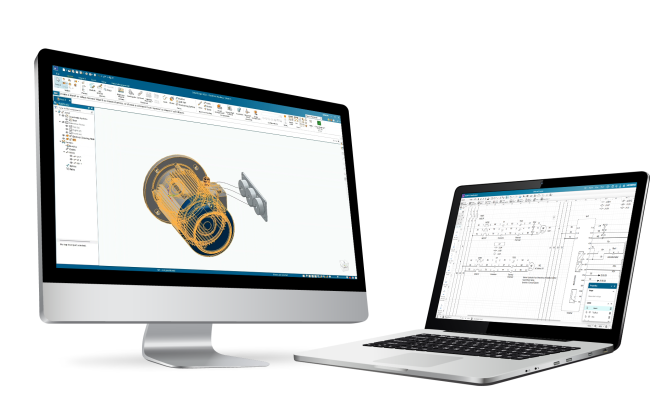
Electromechanical Codesign refers to structured collaboration between electrical and mechanical engineering disciplines during panel or product development. Instead of manually recreating or interpreting electrical data inside MCAD environments, structured design information transfers between ECAD and MCAD tools to maintain consistency across schematics, BOMs, and mechanical assemblies.
Capital X Panel Designer Advanced is built for this. It supports coordinated ECAD and MCAD engineering workflows through structured data transfer aligned with Siemens Xcelerator tools, including Designcenter Solid Edge, Designcenter X, and Teamcenter.
What Advanced does differently
The Advanced tier extends panel design beyond drawing into structured engineering data exchange. Export schematic data and panel BOM information into formats recognized by Siemens Xcelerator tools, so engineering teams can reduce manual reinterpretation and support coordinated ECAD-MCAD workflows.

Direct export to Designcenter Solid Edge and Designcenter X
Component tags, descriptions, and quantities from your 2D schematic transfer directly into your 3D mechanical assembly. Device lists go to the mechanical team automatically.

Enterprise visibility via Teamcenter PLM
Electrical design data feeds directly into Teamcenter so procurement, manufacturing, and mechanical teams all access the same version-controlled information.

Consistent engineering datasets
Fewer version mismatches. Less cross-checking effort. Faster alignment between electrical and mechanical disciplines.
Who benefits from Advanced

Electrical engineers
Export structured design data without manually recreating device lists for the mechanical team.

Mechanical engineers
Receive consistent component information prepared directly from electrical schematics.

Engineering managers
Improve visibility and coordination across electrical and mechanical workflows without chasing both teams.
Haven’t had a chance to test it? We got you.
Sign up for a 30-day free trial now before you make the switch.
Capital X Panel Designer vs Traditional CAD Software
Why Engineers Are Moving Away from Legacy Electrical CAD Tools, And You Should Too
Traditional electrical CAD software was built for a different era of engineering. Installed locally, updated manually, and siloed from mechanical workflows, legacy tools create overhead that modern engineering teams can't afford. You risk increased human errors and costs concurrently with increased demand in the market.
Let’s take a quick look at the differences:
| Capability | Capital X Panel Designer | Traditional Electrical CAD |
|---|---|---|
| Accessibility | Cloud-native, browser-based. No installation, easy access anywhere. | Locally installed. Tied to a specific machine or license seat. |
| Collaboration | Real-time, simultaneous. Multiple engineers on the same schematic. | File-based. One person at a time. Version conflicts common. |
| Electromechanical codesign within Siemens Xcelerator environment | Structured data transfer to Designcenter Solid Edge, Designcenter X, and Teamcenter on Advanced plan. | Manual export via spreadsheet or neutral formats. Error-prone. |
| Symbol library access | Built-in library covering IEC, JIC, NFPA, P&ID, pneumatic, and hydraulic standards. Custom symbol creation and reuse across projects. | Varies. Often requires manual import or separate license for extended libraries. |
| Updates and maintenance | Automatic. SaaS based. Always on the latest version, no IT involvement. | Manual updates required. Often tied to annual maintenance contracts. |
| Scalability for SMBs | Flexible plans. Start on Essentials, scale up as the team grows. | High upfront cost. Seat-based licensing can be restrictive for smaller teams. |
| Electrical drafting standards | JIC/NFPA, IEC 60617, P&ID, hydraulic and pneumatic circuits supported. | Standards support varies by product and edition. |
Comparison is generalized and based on commonly reported characteristics of traditional installed electrical CAD tools. Specific products may vary.
Reset and recharged from your summer break? Time to upgrade to a more modern, efficient electrical CAD tool, and tackle new projects with less friction.
Save time, reduce costs, and achieve more with less. Let the automation tools do the heavy lifting while you focus on the details that actually matter.

Frequently Asked Questions (FAQs)
About Summer Sale & Pricing
1. What is the best electrical CAD software deal for new users this summer?
The Summer Sale gives new and existing users 30% off all plans. Purchase directly via the links on this page, or apply code SUMMER30 at checkout. The sale runs through August 7, 2026. The biggest discount Capital X Panel Designer offers in the year.
2. I'm an existing user. Can I still benefit from the Summer Sale?
Yes, if you are looking to purchase an additional license, you can get the 30% Summer Sale discount. Apply code SUMMER30 at checkout.
3. What plans does the Summer Sale apply to?
The 30% Summer Sale discount applies to all plans: Essentials Monthly, Essentials Annual, Standard Annual, and Advanced Annual. Apply code SUMMER30 at checkout.
4. Is it better to buy monthly or annual during the Summer Sale?
Annual plans give you the most value during the Summer Sale. Both monthly and annual plans receive the same 30% discount — but annual locks in the lower rate for the full year, making it the more cost-effective option for teams with ongoing electrical design work.
5. Can I switch from monthly to annual during the Summer Sale?
Monthly and annual are separate plans. To move to annual, you would need to cancel your current monthly subscription and purchase an annual plan independently. Here’s how you can do it.
About Capital X Panel Designer
1. What is Capital X Panel Designer? Is it a cloud-based electrical drafting tool?
Capital X Panel Designer is a cloud-native electrical CAD and panel design platform built for electrical engineers and panel designers. It runs entirely in the browser with no installation required, and supports electrical schematic design, wiring diagram creation, panel layout, and real-time team collaboration. Used by engineering teams in industrial machinery, heavy equipment, energy & utilities, electronic, medical, consumer, and process industries, it is designed to scale with your business — from a single engineer to a full cross-discipline team.
2. How is Capital X Panel Designer different from general-purpose CAD tools?
General-purpose CAD tools are designed for broad drafting and modelling workflows. Capital X Panel Designer is purpose-built for electrical engineering, specifically schematic design, wiring diagrams, and panel layout. This means your team works with manufacturer-specific component libraries, industry-standard circuit types, and an interface designed around electrical engineering workflows rather than adapting a general tool to fit them.
3. What industries use Capital X Panel Designer?
Capital X Panel Designer is used by electrical engineering teams across industrial machinery, heavy equipment, energy and utilities, process industries, electronics, and medical device manufacturing. Its browser-based architecture and manufacturer-specific component libraries make it practical for teams working across a wide range of electrical design requirements.
4. Is Capital X Panel Designer suitable for small engineering businesses?
Yes. Capital X Panel Designer is built with small and mid-sized engineering businesses in mind. The Essentials plan requires no installation, no IT infrastructure, and no long-term commitment on monthly billing — making it accessible from day one. As your team grows, Standard and Advanced plans scale with you, adding circuit types, component libraries, on-premise access, and cross-discipline electromechanical codesign capabilities without switching platforms.
5. What is the difference between Capital X Panel Designer Essentials, Standard, and Advanced?
Essentials is built for small electrical engineering teams that need browser-based schematic and panel design with real-time collaboration, and no installation overhead. Standard adds an on-premise option, hydraulic, pneumatic, and P&ID circuit support, and access to millions of manufacturer-specific components — making it the most complete option for growing firms. Advanced includes everything in Standard, plus electromechanical codesign for teams where electrical and mechanical engineering work together.
About Features & Capabilities
1. Does Capital X Panel Designer support automated wire numbering and cable numbering?
Yes. Capital X Panel Designer automates wire and cable numbering across your schematics, eliminating the manual work of tracking and updating numbers as your design evolves. Numbering stays consistent across your project — if you make changes, the platform updates references automatically, reducing the risk of errors in your final documentation.
2. Can Capital X Panel Designer generate a bill of materials automatically?
Yes. Capital X Panel Designer generates a bill of materials automatically from your schematic and panel layout. As your design changes, the BOM updates in real time so your materials list always reflects the current state of your project without manual reconciliation. This is particularly useful for panel designers who need to hand off accurate component lists to procurement or manufacturing teams.
3. What is ECAD-MCAD integration and why does it matter for panel design?
ECAD-MCAD integration connects your electrical design software with your mechanical CAD tool, so changes in your panel layout (component placement, wire routing, BOM) reflect in the mechanical enclosure design automatically. Without it, engineers manually re-enter data between tools, which introduces errors and rework. For teams that rely on an electromechanical codesign workflow, Capital X Panel Designer Advanced supports this natively, keeping your electrical and mechanical design environments connected, with fewer manual handoffs.
4. What electrical symbols do Capital X Panel Designer support? Can I download them for free?
Capital X Panel Designer includes built-in symbol libraries covering all major electrical and engineering standards — IEC, JIC, NFPA, P&ID, pneumatic, hydraulic, and Layout 3D. Your team can work to whichever standard your project or client requires without building symbol sets from scratch.
Need something more specific?
Capital X Panel Designer makes it straightforward to create your own custom symbols directly in the platform, so your library grows with your team's needs. Standard symbol libraries are also available as a free download at symbols.radicasoftware.com
5. Can I use Capital X Panel Designer Advanced without Designcenter Solid Edge or Designcenter X?
Yes. The Advanced tier can be used for electrical design workflows without actively using Designcenter Solid Edge, Designcenter X, or Teamcenter. However, access to those tools is required to use electromechanical codesign capabilities.
6. What file formats can I export from Capital X Panel Designer?
Capital X Panel Designer supports exports to PDF, DWG, and DXF formats. This means your electrical drawings and panel layouts can be shared with clients, contractors, or manufacturing teams regardless of the tools they use. No compatibility issues, no manual conversion required.
Your Next Project Doesn’t Have To Start With A Blank Schematic.
The Summer Sale runs July 20 – August 7, 2026. Apply code SUMMER30 at checkout and save 30% on any Capital X Panel Designer plan. This is the best price of the year. Don’t leave it on the table.
Not ready to commit yet?
Try Capital X Panel Designer free for 30 days. No credit card required, no IT setup, up and running in your browser from day one.