Capital X Panel DesignerPartner Enablement Hub
Everything you need to confidently position, demonstrate, and sell Capital X Panel Designer.
This hub supports partners in positioning Capital X Panel Designer, with a focus on the Advanced plan, designed for customers who require electromechanical co-design and closer alignment between ECAD and MCAD workflows.
Explore Product FeaturesGo to Partner ResourcesMeet Capital X Panel Designer
Siemens’ Cloud-native Electrical CAD Solution
Designed for electrical panel design and schematic workflows. It supports engineering teams and SMBs looking to reduce the overhead and complexity associated with traditional, locally installed CAD tools.
What it enables for customers:

Cloud-native access
Browser-based access on any device. No installation, no updates, no IT hassle.

Built for Speed & Collaboration
Real-time collaboration and automation (Autowiring / Autorenumbering) that scales from simple panels to complex machinery.

Bridging Siemens Ecosystem
Integration with Designcenter Solid Edge, Designcenter X, and Teamcenter for a unified ECAD-MCAD workflow.
From Electrical Design to Coordinated Engineering Workflows:
The Advanced plan extends Capital X Panel Designer beyond standalone electrical design, supporting customers who require tighter coordination across engineering disciplines.
While Essentials and Standard solve basic design needs, the Advanced Tier integrates the customers into the Siemens Xcelerator Ecosystem.
What the Advanced Tier Enables Partners:
Higher Deal Value
Significantly increase your professional services and subscription revenue.
Stickier Accounts
By integrating ECAD with MCAD (Designcenter Solid Edge/Designcenter X) and PLM (Teamcenter), you become a mission-critical partner in their digital transformation.
The "Zero Manual Data" Pitch
Advanced is the only tier that eliminates manual checking and file transfers, which are the #1 cause of engineering delays.

Subscription Plans — How Partners Lead the Conversation
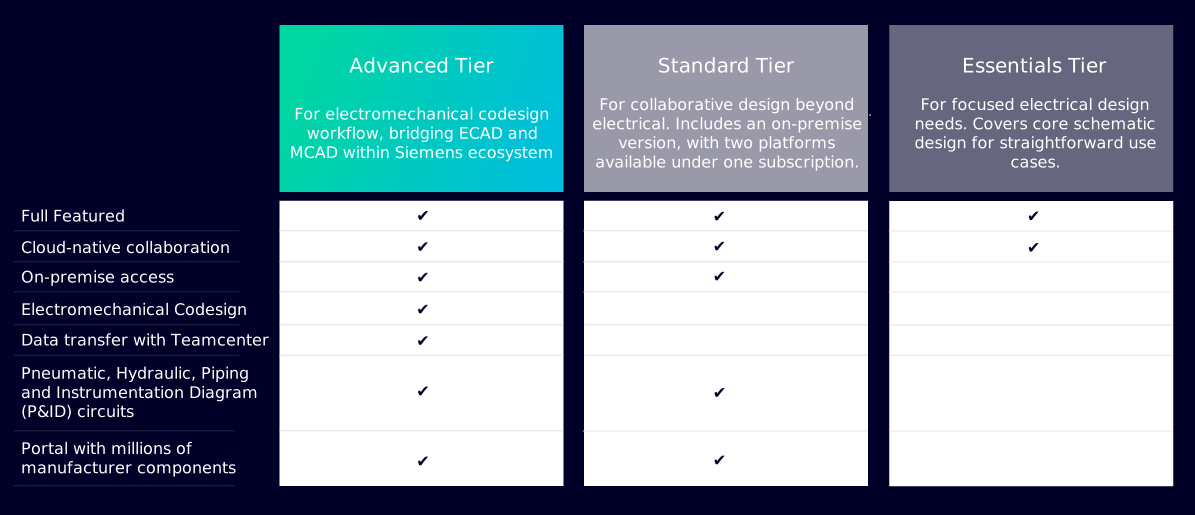
Capital X Panel Designer is offered in three subscription plans. In partner-led customer discussions, Advanced typically serves as the reference point, with Essentials and Standard providing context for customers with more limited or early-stage requirements.
This approach allows partners to start with the most complete workflow and align recommendations based on how customers operate today.
| Advanced TierFor electromechanical codesign workflow, bridging ECAD and MCAD within Siemens ecosystem | Standard TierFor collaborative design beyond electrical. Includes an on-premise version, with two platforms available under one subscription. | Essentials TierFor focused electrical design needs. Covers core schematic design for straightforward use cases. | |
|---|---|---|---|
| Full featured | ✔ | ✔ | ✔ |
| Cloud-native collaboration | ✔ | ✔ | ✔ |
| On-premise access | ✔ | ✔ | |
| Electromechanical Codesign | ✔ | ||
| Data transfer with Teamcenter | ✔ | ||
| Pneumatic, Hydraulic, Piping and Instrumentation Diagram (P&ID) circuits | ✔ | ✔ | |
| Portal with millions of manufacturer components | ✔ | ✔ |

Target Industries & Customer Reference
Capital X Panel Designer is commonly adopted in industries where electrical panel design is a core engineering function, including:
- Industrial machinery
- Manufacturing and OEMs
- Heavy equipment
- Medical devices
- Electronics

Recent win: Arkadia Space
Arkadia Space significantly streamlined its engineering workflows by adopting Capital X Panel Designer Advanced, overcoming challenges with fragmented tools and manual processes.
1 / 3


Product Learning & Enablement
Access product overviews, sample circuits, training videos, and demo resources to support partner-led customer discussions and demonstrations. Partners can use these resources selectively based on the customer scenario, rather than consuming everything end to end.
Capital X Panel Designer at a glance
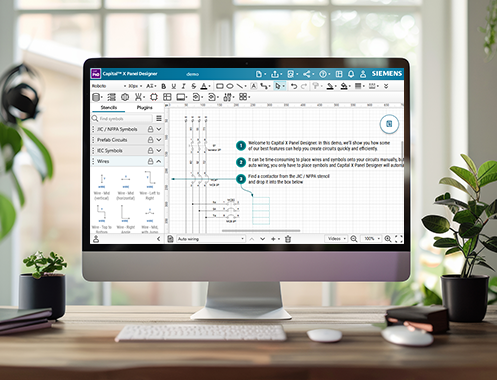
A short, two-minute overview designed to help partners quickly understand how Capital X Panel Designer is positioned and how it fits into common customer workflows.

Full Workflow Tutorial
An end-to-end walkthrough of Capital X Panel Designer, covering core workflows and features relevant to the Advanced plan, from schematic creation through coordinated engineering workflows.
Use chapter timestamps to focus on what matters most for your customer discussions.
1:27 Dashboard Navigation and Team Collaboration
2:44 Getting Started with the Editor and Plugins
4:21 Manage Automation Capabilities – Enable/Disable Automation Features
4:44 How to Create and Customize Title Blocks
6:54 Using Standard Symbols and Creating Custom Symbols
8:13 Import and Assign Manufacturer Components
9:06 Building Schematics with Wires, PLCs, and Sensors
11:54 Adding Terminals, Wire Links and Prefab Circuits
13:58 Real-time Collaboration and Version Control
15:50 Save and Reuse Pages Across Projects
16:14 Cross-Referencing Tools for Symbols and Wires
17:56 Component and Cable Management
20:38 Using Component and Cable Tags
21:32 Export and Update Data with Reports
22:41 Terminal Listing and Layout Automation
24:40 Panel Layout Generation – DIN Rail, 3D Views, and Auto-Snap
26:41 Generate BOM, Cable, and Connection Reports
30:17 Version Control and Project Tracking
31:19 Integrations with Teamcenter, Designcenter Solid Edge, and Designcenter X (Siemens Xcelerator)
31:47 Generate and publish BOM to Teamcenter
33:05 Export Connectivity Data and Generate BOM to Designcenter Solid Edge and Designcenter X
33:57 Seamless Data Exchange with Designcenter Solid Edge
36:08 Seamless Data Exchange with Designcenter X
38:39 Create Pneumatic, Hydraulic, and P&ID Drawings
39:41 Outro –Try Demo or Start Free Trial
Sample circuits
A set of IEC/JIC-compliant sample schematics partners can use to understand and reference how Capital X Panel Designer supports electrical, pneumatic, hydraulic, and P&ID workflows.
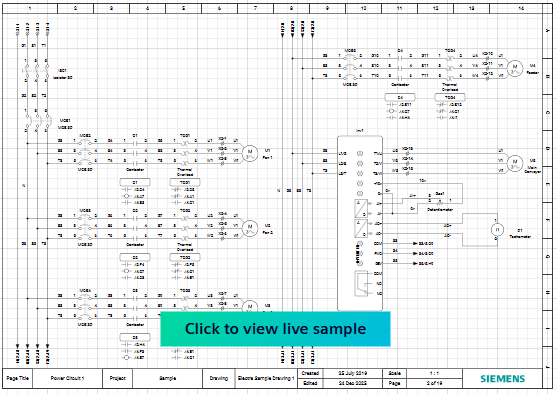
JIC circuit
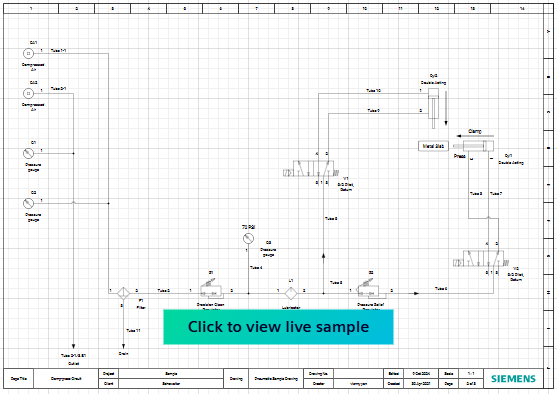
Pneumatic circuit
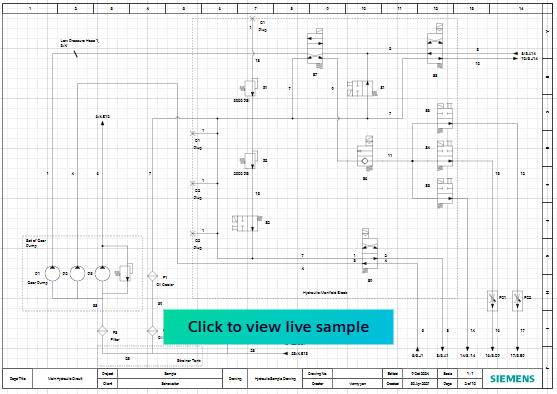
Hydraulic circuit
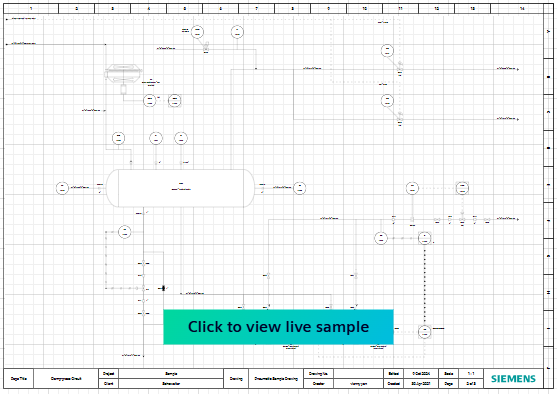
P&ID circuit
Tutorial videos
A series of short tutorials partners can use to become familiar with Capital X Panel Designer and comfortably demonstrate key workflows and automation features in customer conversations.
1.

AutowiringWhen symbols are dropped, they will be automatically wired, significantly speeding up circuit design.
2.

Intelligent numberingAutomatically renames symbols and wires to the next available sequential number.
3.

Real-time cross referenceQuickly locate symbols and wires across schematics and simplify cross-checking.
4.

Generate and export reportsInstantly create BOMs, cross reference reports, table of contents, and various reports.
5.
Generate panel layoutsQuick panel layout creation based on components on the schematic, with real world dimensions.
6.

Streamline terminal layoutsAutomatically generate, count and number terminals in a click.
7.

Seamless component integration with CADENASAccess millions of components and layouts and import them directly.
8.
Electromechanical co-design made simpleUnify ECAD-MCAD design workflows with the Advanced Plan to improve collaboration among teams.
Capital X Panel Designer Field Training
A set of field-focused training videos partners can use to understand how Capital X Panel Designer is used in practice. These videos cover demo-oriented workflows, plan context, and positioning considerations to support partner-led demonstrations.
Available in:

Webinar
A recorded session covering product context and an end-to-end schematic workflow demonstration in Capital X Panel Designer. Partners can use this webinar to understand how the solution is typically demonstrated and how key concepts are positioned during customer discussions.

Demo toolkit
A set of ready-to-use schematic files designed specifically for partner-led customer demonstrations of Capital X Panel Designer. These assets provide a practical starting point for demos and can be adapted to different customer discussions.
Download here:
Our Competitive Edge
Capital X Panel Designer is often evaluated alongside traditional electrical CAD tools. Partners typically differentiate it by focusing on how customers design, collaborate, and scale, rather than on feature-by-feature comparisons.
How partners commonly position Capital X Panel Designer:
Cloud-native by design
Runs entirely in the browser, without local installation or manual updates.
Why it matters:
Reduces deployment complexity and ongoing maintenance compared to traditional, locally installed CAD software.
Partner takeaway:
"This removes infrastructure and update overhead from the customer conversation."

Purpose-built for electrical panel design
Designed specifically for electrical schematics and panel workflows.
Why it matters:
Electrical engineers work with tools tailored to their workflows, rather than adapting generic CAD platforms.
Partner takeaway:
"It speaks the language of electrical engineers."
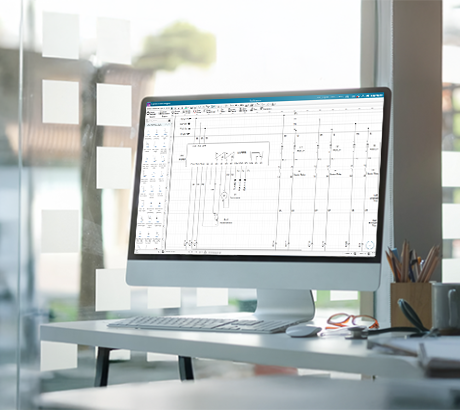
Practical symbol and component workflows
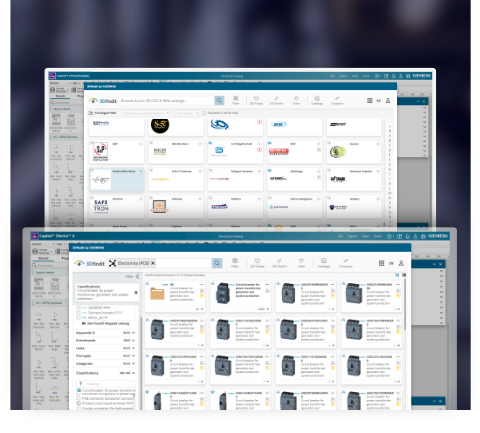
Predesigned symbol libraries, prefab circuits, fast symbol search, DXF/DWG import, and access to manufacturer components instantly.
Why it matters:
Working with realistic symbols and components is central to everyday electrical design and demo scenarios.
Partner takeaway:
"This is easy to show using real electrical symbols and components."
Cost-efficient by architecture
Cloud-native deployment removes the need for dedicated hardware, local installations, and ongoing maintenance tied to traditional CAD environments.
Why it matters:
Customers can avoid infrastructure and IT overhead typically associated with locally installed CAD software, especially as teams scale.
Partner takeaway:
"This changes the cost conversation from licenses and infrastructure to usage and flexibility."

Electromechanical co-design with Advanced
The Advanced plan bridges electrical design with mechanical design and lifecycle systems within the Siemens Xcelerator ecosystem. Partners can highlight integration with Designcenter Solid Edge, Designcenter X, and Teamcenter for BOM and design data management, reduced manual checking, and faster cross-domain alignment.
Why it matters:
In structured engineering environments, coordination across disciplines becomes increasingly important.
Partner takeaway:
"This is where Advanced becomes the right fit."

Cloud-native by design
Purpose-built for electrical panel design
Practical symbol and component workflows
Cost-efficient by architecture
Electromechanical co-design with Advanced
Cloud-native by design
Cloud-native by design
Runs entirely in the browser, without local installation or manual updates.
Why it matters:
Reduces deployment complexity and ongoing maintenance compared to traditional, locally installed CAD software.
Partner takeaway:
"This removes infrastructure and update overhead from the customer conversation."
Purpose-built for electrical panel design
Purpose-built for electrical panel design
Designed specifically for electrical schematics and panel workflows.
Why it matters:
Electrical engineers work with tools tailored to their workflows, rather than adapting generic CAD platforms.
Partner takeaway:
"It speaks the language of electrical engineers."
Practical symbol and component workflows
Practical symbol and component workflows
Predesigned symbol libraries, prefab circuits, fast symbol search, DXF/DWG import, and access to manufacturer components instantly.
Why it matters:
Working with realistic symbols and components is central to everyday electrical design and demo scenarios.
Partner takeaway:
"This is easy to show using real electrical symbols and components."
Cost-efficient by architecture
Cost-efficient by architecture
Cloud-native deployment removes the need for dedicated hardware, local installations, and ongoing maintenance tied to traditional CAD environments.
Why it matters:
Customers can avoid infrastructure and IT overhead typically associated with locally installed CAD software, especially as teams scale.
Partner takeaway:
"This changes the cost conversation from licenses and infrastructure to usage and flexibility."
Electromechanical co-design with Advanced
Electromechanical co-design with Advanced
The Advanced plan bridges electrical design with mechanical design and lifecycle systems within the Siemens Xcelerator ecosystem. Partners can highlight integration with Designcenter Solid Edge, Designcenter X, and Teamcenter for BOM and design data management, reduced manual checking, and faster cross-domain alignment.
Why it matters:
In structured engineering environments, coordination across disciplines becomes increasingly important.
Partner takeaway:
"This is where Advanced becomes the right fit."
How Capital X Panel Designer Compares
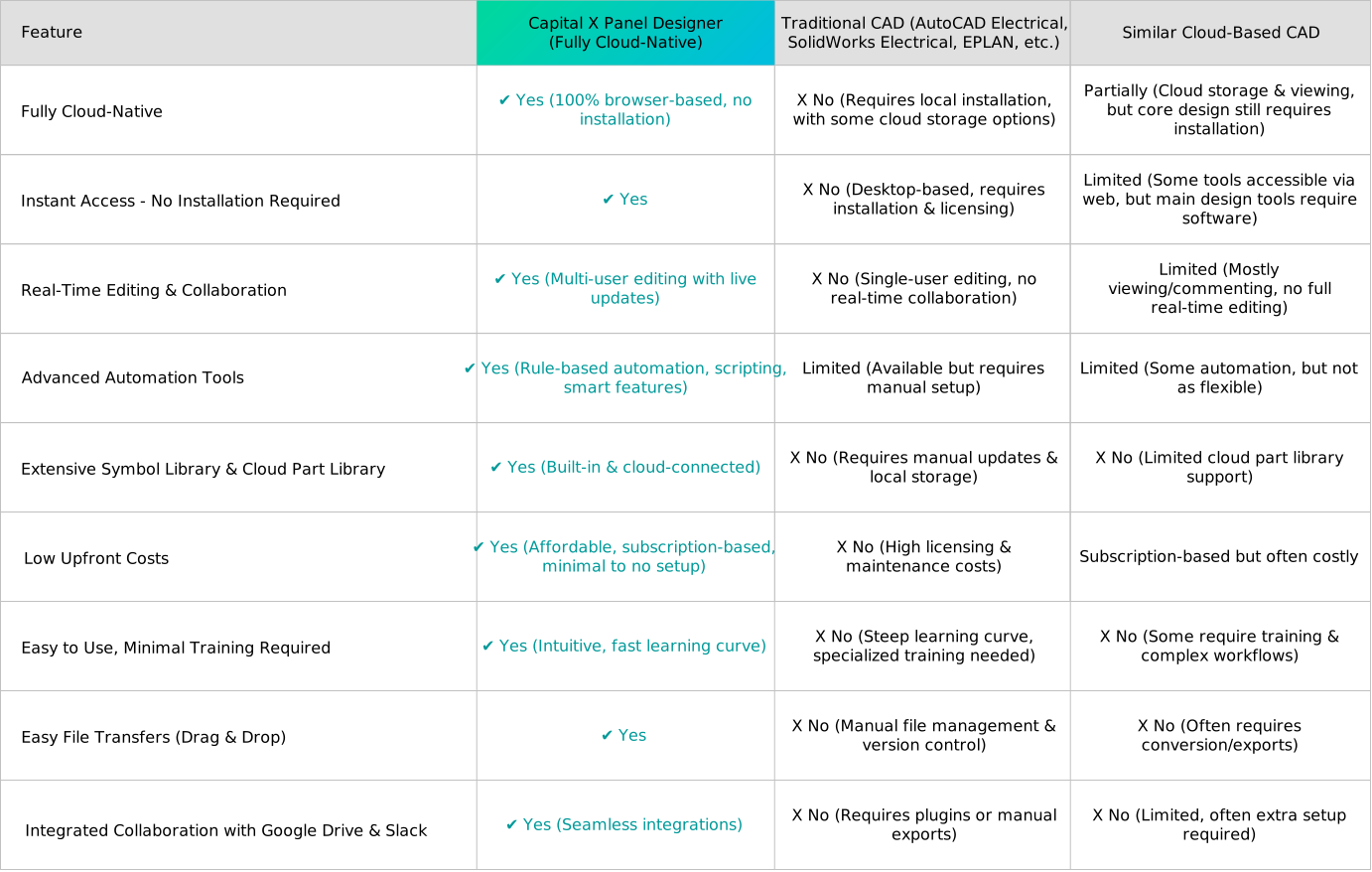
The comparison below highlights how Capital X Panel Designer approaches electrical schematic design compared to traditional CAD tools. Partners can use this view to confidently frame differences around deployment, collaboration, and workflow flexibility when customers are evaluating alternatives.
It is intended to support clear, factual discussions — helping partners explain where Capital X Panel Designer is a strong fit and when it offers a more modern approach.
| Feature | Capital X Panel Designer (Fully Cloud-Native) | Traditional CAD (AutoCAD Electrical, SolidWorks Electrical, EPLAN, etc.) | Similar Cloud-Based CAD |
| Fully Cloud-Native | ✔ Yes (100% browser-based, no installation) | X No (Requires local installation, with some cloud storage options) | Partially (Cloud storage & viewing, but core design still requires installation) |
| Instant Access - No Installation Required | ✔ Yes | X No (Desktop-based, requires installation & licensing) | Limited (Some tools accessible via web, but main design tools require software) |
| Real-Time Editing & Collaboration | ✔ Yes (Multi-user editing with live updates) | X No (Single-user editing, no real-time collaboration) | Limited (Mostly viewing/commenting, no full real-time editing) |
| Advanced Automation Tools | ✔ Yes (Rule-based automation, scripting, smart features) | Limited (Available but requires manual setup) | Limited (Some automation, but not as flexible) |
| Extensive Symbol Library & Cloud Part Library | ✔ Yes (Built-in & cloud-connected) | X No (Requires manual updates & local storage) | X No (Limited cloud part library support) |
| Low Upfront Costs | ✔ Yes (Affordable, subscription-based, minimal to no setup) | X No (High licensing & maintenance costs) | Subscription-based but often costly |
| Easy to Use, Minimal Training Required | ✔ Yes (Intuitive, fast learning curve) | X No (Steep learning curve, specialized training needed) | X No (Some require training & complex workflows) |
| Easy File Transfers (Drag & Drop) | ✔ Yes | X No (Manual file management & version control) | X No (Often requires conversion/exports) |
| Integrated Collaboration with Google Drive & Slack | ✔ Yes (Seamless integrations) | X No (Requires plugins or manual exports) | X No (Limited, often extra setup required) |
This comparison is based on publicly available information and general industry knowledge as of 2024. Product features, pricing, and capabilities may change over time.
We encourage users to conduct their own research and consult official sources to make an informed decision. All trademarks and product names mentioned belong to their respective owners.
Key Takeaways
- Capital X Panel Designer is one of the few truly cloud-native electrical CAD tools.
- Most electrical CAD software in the market only have partial cloud functionality - they rely on cloud storage but still require local installations for full design work.
- Having real-time collaboration & cloud capabilities are essential to cost savings especially for budget-conscious and productivity-focused engineers.
Use this comparison as a reference to confidently explain where Capital X Panel Designer fits when customers are comparing options.
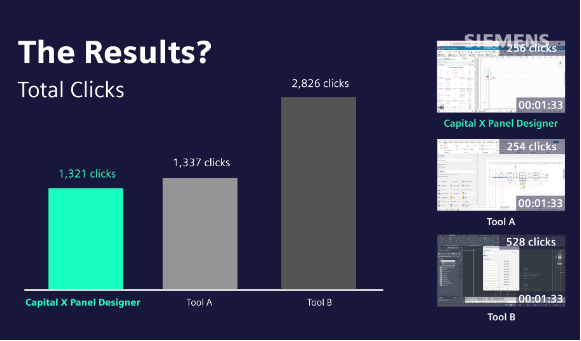
How does Capital X Panel Designer perform compared to other software?
This video provides a concise, visual overview of how Capital X Panel Designer compares to other electrical CAD tools. The comparison shown is based on internal testing and reflects the same differences partners typically highlight during customer discussions.
Partners can use this video as a reference or visual aid when they want an additional way to reinforce comparison points.
Partner Quick Access

Highspot
Central access to Capital X Panel Designer sales assets, including decks, videos, eLearnings, and reference materials partners can use throughout the sales cycle.
- Go to Highspotⓘ You’ll be asked to sign in to access these resources.

Pre-Sales Deck
A curated set of sales-ready presentations designed to support discovery and early-stage customer conversations around Capital X Panel Designer.
- Go to Pre-sales deckⓘ You’ll be asked to sign in to access these resources.

Partners Guide
An overview deck designed to orient partners on Capital X Panel Designer, including key context, positioning guidance, and links to additional resources.
- Go to Partners guideⓘ You’ll be asked to sign in to access these resources.

Customer Trial & Demos
Direct links to start a free trial and download demo assets to share with customers.
Explore Capital X Panel Designer Further
Partners can use the resources here to support customer exploration, with the free trial as the primary next step.
One Step Ahead
Start with a free 30-day cloud-native trial to evaluate workflows, automation, and overall fit. An on-premise trial is available for customers with specific deployment requirements.
Partners are encouraged to use the trial directly to build hands-on familiarity before introducing the solution to customers. Trial extensions can be requested through support if additional time is needed.
Interactive demo
A fast, guided experience to explore how Capital X Panel Designer looks and functions before starting a trial.
Benefits
An overview of core capabilities and workflows, useful for reinforcing value before or after trial access.
Free symbols
Access a selection of electrical symbols and components that can be used to preview schematic workflows. Download for free, anytime.
Blog
Industry insights and best practices related to electrical design and engineering workflows.
If you need additional clarification or have more in-depth customer questions, please reach out to us at [email protected].
Partners are encouraged to explore the Capital X Panel Designer Community page to engage in product discussions, share best practices, and submit ideas or feedback based on customer experiences.

Unlock Your Demo Toolkit
Sign up to access your partner-exclusive demo kit and receive the latest product updates to your inbox — everything you need to accurately position, demo, and sell Capital X Panel Designer.
Sign up for mailing list
Get your partner-exclusive demo kit and the latest product updates in your inbox — everything you need to accurately position, demo, and sell Capital X Panel Designer.