CYBER MONDAY CAMPAIGN · NOVEMBER 26 TO DECEMBER 11, 2026
Design More.Repeat Less.
Save 30% on eligible Capital X Panel Designer plans.
Reduce repetitive electrical drafting, reuse engineering content, and keep projects moving with cloud-native electrical CAD built for modern engineering teams.
Use code CYBER30 at checkout. Eligible plans only. Terms apply.

PURPOSE-BUILT ELECTRICAL CAD
Less repetitive drafting. More room for real engineering.
Capital X Panel Designer supports electrical schematic design, panel layouts, and team workflows with tools created for electrical engineering.

Reduce repetitive drafting
Use electrical-specific automation to handle routine schematic tasks with less manual effort.

Reuse symbols, not effort
Access built-in electrical symbols and save custom components for reuse across projects.

Keep your team aligned
Collaborate on electrical schematics without exchanging multiple file versions.

Open your browser and design
Access your cloud-native workspace without installing desktop software.
Cyber Monday Offer
Choose the Capital X Panel Designer plan that fits your engineering requirements.
Save 30% with code CYBER30. Campaign ends December 11, 2026.
For connected ECAD-MCAD teams

Advanced
Everything in Standard, plus electromechanical codesign capabilities for coordinated electrical and mechanical engineering workflows.
- Includes Standard capabilities
- Electromechanical codesign
- Structured engineering data transfer
More engineering capabilities

Standard
Everything in Essentials, plus additional circuit types, manufacturer-specific components, and an on-premise option.
- Includes Essentials capabilities
- Hydraulic, pneumatic, and P&ID workflows
- Expanded component resources and offline option
Cloud-native electrical design

Essentials
Browser-based electrical schematic and panel design with real-time collaboration for smaller engineering teams.
- Cloud-native access
- Electrical schematics and panel design
- Monthly and annual subscription options

Need purchase assistance? Enter CYBER30 at checkout or contact purchase support if you need help completing your order.
Choosing between Essentials Monthly and Annual?
Best Value
Essentials Annual
1
Best for ongoing electrical design requirements
2
Predictable annual subscription cost
3
Recommended for regular users
4
Make greater use of the promotional price across the year
Essentials Monthly
1
Best for short-term or project-based work
2
Lower initial commitment
3
Flexible access before a longer commitment
4
Suitable when access is needed for a limited period
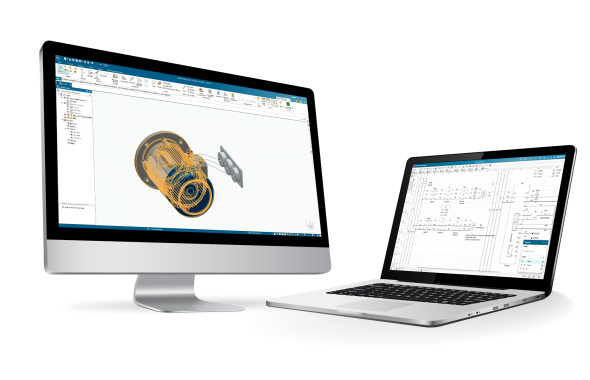
Capital X Panel Designer Advanced
Less ECAD-MCAD rework. More connected engineering.
Transfer structured electrical design information into supported Siemens Xcelerator workflows, reducing manual recreation and helping ECAD and MCAD teams work from more consistent engineering data.
1
Transfer design information downstream
Share component tags, descriptions, and quantities with supported mechanical engineering workflows.
2
Connect with Teamcenter
Make electrical design information available within broader product and engineering processes.
3
Improve cross-discipline coordination
Help electrical and mechanical teams work with more consistent engineering information.
A Smarter Fit for Modern Electrical Design
Compare Capital X Panel Designer with common characteristics of traditional, locally installed CAD workflows.
| Capability | Capital X Panel Designer | Traditional Electrical CAD |
|---|---|---|
| Access | Cloud-native, browser-based access for supported plans | May require local installation or device-based access |
| Collaboration | Real-time collaboration on electrical schematics | File-based workflows may require additional version management |
| Connected engineering | Structured data transfer to supported Siemens Xcelerator workflows with Advanced | May rely on spreadsheets, neutral formats, or manual data recreation |
| Symbols | Built-in libraries and reusable custom symbols | Availability varies by product, configuration, and licensing model |
| Updates | Automatic SaaS updates that reduce manual installation and maintenance effort | Updates may require local deployment and maintenance planning |
Comparison reflects common characteristics of traditional locally installed CAD workflows. Capabilities vary by product, configuration, and licensing model.
Frequently Asked Questions (FAQs)
What is the Cyber Monday offer?
Save 30% on eligible Capital X Panel Designer plans from November 26 to December 11, 2026. Enter code CYBER30 at checkout.
Which plans qualify?
Eligible plans include Essentials Monthly, Essentials Annual, Standard Annual, and Advanced Annual. See the campaign terms for full eligibility details.
Can existing customers use the offer?
Existing customers may be eligible when adding licenses, reactivating a subscription, or changing plans. See the campaign terms or contact purchase support to confirm eligibility for your subscription.
Should I choose Essentials Monthly or Annual?
Choose Annual for ongoing electrical design requirements and a predictable yearly subscription. Choose Monthly for shorter, project-based needs or a lower initial commitment.
Can I try Capital X Panel Designer before purchasing?
Yes. Start a 30-day free trial to explore the cloud-native electrical design workflow before choosing a subscription.
What happens after checkout?
Follow the purchase confirmation and activation instructions provided after checkout. Contact purchase support if you need help accessing your subscription.
Cyber Monday Campaign · November 26 to December 11, 2026
Less manual work starts with the right tools.
Design more and repeat less with Capital X Panel Designer.
Save 30% on eligible plans with code CYBER30.
*Eligible plans only. Terms apply.