July 26, 2024 · Capital X Panel Designer · Electrical CAD
Real Time Collaboration in Electrical Schematic Design: Best Practices for Engineering Teams
Key Takeaways
- Real-time collaboration improves accuracy and speed by allowing teams to work on the same schematic simultaneously with instant updates.
- Cloud-based collaboration reduces version conflicts and removes the need for manual file sharing or tracking.
- Real-time electrical schematic collaboration supports distributed teams, enabling engineers, contractors, and clients to stay aligned across locations.
- Built-in communication, commenting and version control help teams coordinate revisions, reduce design conflicts and maintain a clear project history.
- Clear responsibilities, structured communication and consistent review processes remain essential for effective electrical design collaboration.
- Capital™ X Panel Designer enables seamless collaboration workflows, combining cloud-based access, automation, and secure sharing in one platform.
Why Real-Time Collaboration is Critical for Electrical Schematic Design
In electrical engineering projects, real-time collaboration is essential for managing complex schematic designs across distributed teams. Engineers, system integrators, contractors, and clients must coordinate efficiently to maintain accuracy, reduce delays, and ensure design consistency.
This guide outlines best practices and workflows to improve communication, streamline revisions, and maintain design quality.
How Real-Time Collaboration Improves Accuracy and Efficiency in Electrical Schematic Design
Real-time collaboration minimizes errors and prevents duplicated work by ensuring all stakeholders are working on the same schematic simultaneously. It supports consistent electrical diagram development using standardized symbols, improving clarity across teams.
It keeps teams aligned, enabling faster issue detection and more efficient revision management.
It also brings together diverse expertise, improving design quality and decision-making.
How Cloud-Based Collaboration Improves Stakeholder Alignment in Electrical Design
Electrical schematic design projects involve multiple stakeholders, each contributing different expertise. Without structured collaboration, this often leads to miscommunication, delays, and inconsistent design updates.
Using cloud-based collaboration improves alignment by enabling:
- Instant updates with shared visibility across teams
- Real-time feedback between engineers, contractors, and clients
- Faster coordination across internal and external stakeholders
This ensures transparency and keeps all stakeholders aligned on the latest schematic version.
These workflows are easier to maintain when collaboration is built directly into the CAD environment. This is one reason engineering teams are considering the broader advantages of cloud-native electrical CAD instead of relying on file-based design workflows.
Common Challenges in Collaborative Electrical Design Projects
Collaborative electrical design can become difficult when teams work across different disciplines, locations and stages of a project. Common issues include:
- Conflicting priorities across teams
- Coordination issues in distributed environments
- Unclear requirements and constraints
- Inefficient revision tracking
These challenges lead to delays, rework, and reduced productivity.
Addressing these issues requires clear responsibilities, structured communication and better control over design revisions.
How to Improve Real-Time Collaboration in Electrical Design Projects
1. Define roles and responsibilities clearly
Establishing clear ownership prevents duplication and ensures accountability across all design stages. Each team member understands their role, reducing confusion and improving coordination.
2. Remove communication barriers
Effective collaboration requires clear communication channels and defined feedback processes.
Teams should:
- establish where design feedback and technical discussions should take place;
- encourage engineers and reviewers to raise issues early;
- maintain regular check-ins for decisions that require wider project input.
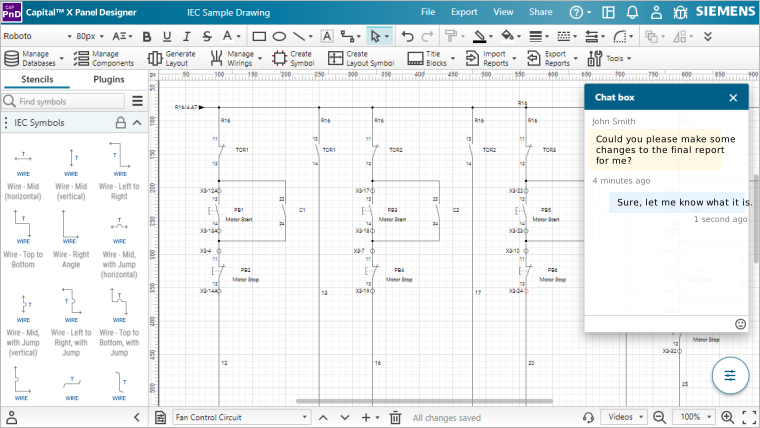
Cloud-based electrical CAD can support these practices through shared design views, comments, annotations and a built-in chat system. Keeping feedback close to the schematic reduces the need to reconstruct design discussions from separate email threads or messaging platforms.
3. Managing complex design revisions effectively
Design revisions are inevitable but can introduce errors if not managed properly.
Teams should:
- Document and communicate all changes
- Maintain clear revision histories
- Conduct regular design reviews and validation checks
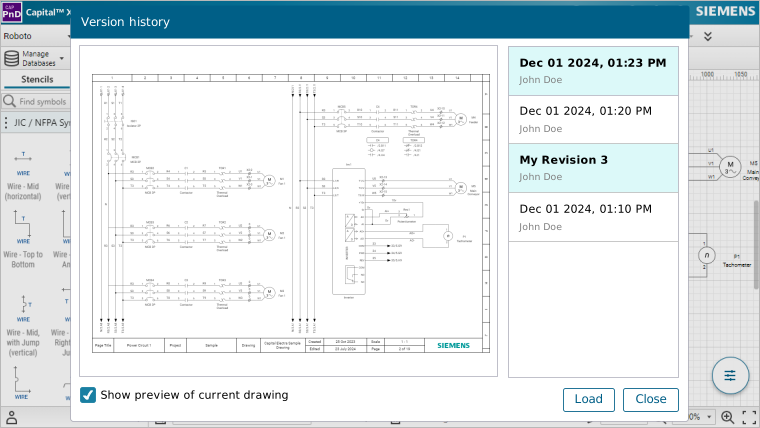
Real-time comments and annotations keep feedback connected to relevant design changes, while built-in version control maintains a record of previous revisions. This makes it easier to track updates, review changes and restore an earlier version when needed.
Why Cloud-Native Electrical CAD Makes Real-Time Collaboration Possible
Cloud-based electrical CAD provides a shared environment for collaborative engineering workflows. Project data is stored centrally and accessed through the browser, so team members can work on the same design without passing separate project files between users.
The practical benefits extend beyond simultaneous editing. Cloud-native ECAD can also provide remote access, revision histories and controlled access to project information.
1. Real-time collaboration
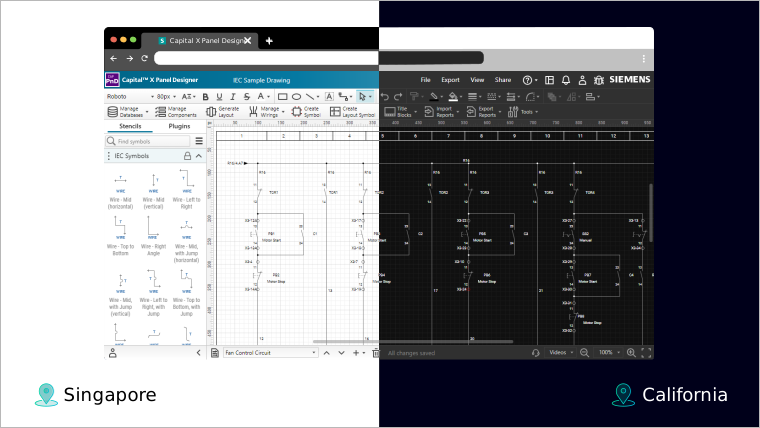
A real-time collaborative editor allows multiple users to work on the same schematic while changes are synchronized across the shared project. Engineers can review updates as they happen, reducing the need to exchange separate design files or wait for updated copies.
2. Accessibility
Cloud-based tools allow access from any device, enabling flexible collaboration across locations. Team members can work on design projects from anywhere, at any time using any internet-connected device.
Because the CAD environment is browser-based, authorized team members can open electrical design projects without installing the software on each machine. This makes it easier for distributed engineering teams, external specialists and project stakeholders to access designs and participate in reviews when required.
3. Version control
Cloud-based electrical CAD tools include robust version control systems with built-in version tracking that records every change, creating a clear audit trail of revisions.
Teams can easily review updates, identify changes, and revert to previous versions when needed. This ensures everyone is working on the latest schematic, minimizing miscommunication and maintaining design integrity.
4. Security
Security is a top priority in cloud-based electrical CAD software. Advanced security features offer secure data storage, backup to protect design data from loss, theft, or unauthorized access. Encryption and secure access controls ensure design information is accessible only to authorized team members, safeguarding intellectual property and ensuring compliance with industry standards and regulations.
Maintaining Design Quality with Collaborative Workflows
Using electrical schematic real-time collaboration capabilities, teams can enforce consistency through:
- Centralized symbol libraries
- Agreed electrical symbols and naming conventions
- Shared templates
These controls help different contributors produce drawings using the same conventions, reducing interpretation problems during design reviews and downstream engineering work.
Best Practices for Remote Electrical Design Collaboration
Distributed teams need additional structure because engineers cannot rely on informal face-to-face communication.
For remote electrical design projects:
- establish which platform contains the current schematic and project records;
- define how urgent design issues should be escalated;
- use screen sharing when a drawing requires detailed visual discussion;
- record design decisions where other project members can review them;
- schedule design reviews around major project milestones rather than relying only on ad hoc discussions.
Applying Real-Time Collaboration Workflows with Capital X Panel Designer
Capital X Panel Designer enables real-time collaboration in a browser-based environment where multiple users work on the same schematic simultaneously.
Key capabilities include:
- A real-time collaborative editor that synchronizes changes instantly
- Secure access controls for internal and external stakeholders
- Live commenting and annotation for faster feedback
- Centralized version control to eliminate file conflicts
This removes manual file sharing and ensures teams stay aligned on a single, up-to-date design.
Extending Real-Time Collaboration across Electrical and Mechanical Design Workflows
Capital X Panel Designer extends real-time collaboration beyond schematics, enabling cross-discipline collaboration through a unified electrical and mechanical design workflow that connects design data across teams.
With the Advanced tier, Capital™ X Panel Designer integrates with Siemens Xcelerator tools such as Designcenter Solid Edge, Designcenter X, and Teamcenter, allowing teams to connect electrical design information with mechanical design and PLM workflows.
This enables:
- Direct transfer of schematic data into mechanical design tools
- Shared panel BOMs data in Teamcenter for a single source of truth
- Reduced manual cross-checking between ECAD and MCAD
This unified workflow improves coordination and reduces errors across engineering teams.
How Does Collaborative Electrical CAD Affect Software Cost?
Collaboration features are only one part of evaluating an ECAD platform. Licensing model, user requirements, deployment and available functionality also affect overall software cost.
Explore our guide to cost-effective electrical CAD software pricing to compare plans and choose the right option for your team.
Conclusion: Building a Better Electrical Design Collaboration Workflow
Effective real-time collaboration depends on both engineering practices and the tools supporting them. Teams still need clear responsibilities, agreed review processes and consistent design standards, but cloud-native ECAD removes many of the file-handling barriers that make collaborative electrical design harder to manage.
Capital X Panel Designer brings schematic design, shared project access and collaborative workflows into one browser-based environment, with the Advanced tier extending connected engineering workflows into MCAD and PLM.
Ready to Improve Your Electrical Schematic Workflows?
Start your free 30-day trial with Capital X Panel Designer to see how cloud-based collaboration improves speed, accuracy, and team alignment.
Frequently Asked Questions (FAQs)
1. How does real-time collaboration work in Capital X Panel Designer?
Capital X Panel Designer uses a browser-based collaborative environment where multiple users can work on the same schematic. Changes are synchronized across the shared project, reducing reliance on separate files and helping teams work from an up-to-date design.
2. Can I control who edits or views my electrical schematics?
Yes. Capital X Panel Designer provides customizable access control so project access can be managed for different users. This helps engineering teams collaborate with internal colleagues and external stakeholders while controlling access to project information.
3. How does real-time collaboration reduce version conflicts?
A real-time collaborative editor keeps changes synchronized within the shared project instead of requiring engineers to exchange separate copies of a schematic. Combined with built-in version control, this makes it easier to track changes and reduces the risk of teams working from outdated files.
4. Can clients and contractors collaborate on electrical designs?
Capital X Panel Designer supports collaboration with different project stakeholders through controlled access to shared electrical design information. Clients, contractors and other authorized participants can be brought into the review process without relying on emailed drawing copies.
Capital X Panel Designer also uses the industry-standard SVG file format, supporting accessible electrical drawings that can be viewed and shared across project workflows.
5. Can team members collaborate without installing electrical CAD software on every computer?
Yes. Because Capital X Panel Designer is browser-based, authorized users can access electrical design projects through supported internet-connected devices without installing the CAD environment on every machine.
This can make collaboration easier for distributed engineering teams and stakeholders who need to participate in design reviews from different locations.
6. Can teams recover an earlier version of an electrical schematic?
Built-in version control maintains a history of design changes, allowing teams to review previous revisions and restore an earlier version when required.
This provides a useful safeguard during collaborative design, especially when several engineers contribute changes to the same project.
7. How does Capital X Panel Designer support collaboration between electrical and mechanical teams?
Capital X Panel Designer Advanced extends collaboration into electrical and mechanical design workflows. Teams can share connectivity data with Designcenter Solid Edge and publish BOM information to Teamcenter, reducing manual information exchange between engineering disciplines.
This helps ECAD, MCAD and PLM teams work with connected engineering information as designs progress.