January 19, 2026 · Capital X Panel Designer · Electrical CAD
Cost-Effective Electrical CAD Software: Which Plan Fits Your Needs?
Key Takeaways
- Traditional CAD doubles in cost once training, hardware, and IT are added.
- Cloud-native CAD saves 40–60% and delivers faster design speeds through automation.
- Free plans are best for light, occasional use (<5 hours per month).
- Full-featured and professional plans deliver ROI for consultants and businesses.
- Capital X Panel Designer offers transparent electrical design software pricing, Siemens-backed reliability, and a risk-free trial.
Why Cost-Effective Electrical CAD Software Matters for Modern Engineering Teams
Cost-effective and affordable electrical CAD software helps engineers design, document, and automate electrical systems without the high costs associated with traditional desktop tools.
By combining automation, cloud access, and flexible pricing, modern platforms reduce total ownership costs while improving design speed and accuracy.
This guide breaks down electrical CAD software pricing models, compares plan types, and explains how to choose the right option based on your workload and budget.
Why Conventional CAD Software Costs More Than You Think
What looks like a simple subscription often doubles in price once hidden expenses are factored in.
Hidden Costs
- High per-user license fees
- Training and certification requirements
- Hardware and infrastructure upgrades
- IT support, patches, and backup systems
- Outdated, email-based collaboration
For low-volume electrical CAD software users and small businesses, these costs outweigh the benefits.
Cloud-Native CAD: Lower Costs, Higher Productivity
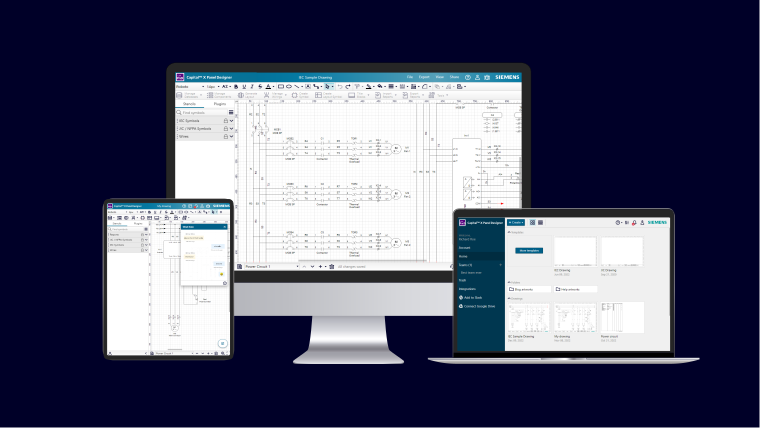
Cloud-native platforms solve this by shifting design to the browser. No installations, no IT overhead — just faster, simpler design.
Advantages
- Zero Infrastructure: No installs, no manual updates, built-in backups.
- Universal Access: Any device with a modern web browser, multi-user editing, secure link sharing.
- Scalable Speed: 40–60% lower total cost, faster schematic design with automation.
Read more on cloud-native electrical CAD advantages.
Electrical CAD Pricing Comparison: Subscription vs. Perpetual
Licensing models directly affect cost and flexibility. Here’s how they compare.
Subscription Licensing
- Predictable monthly or annual payments
- Always on the latest version
- Ideal for teams with variable workloads
Perpetual Licensing
- One-time purchase with ownership
- Break-even after 3–5 years of continuous heavy use
- Extra costs: annual maintenance, IT overhead, upgrades
- Suited for enterprises with stable, high-volume needs
This CAD pricing comparison shows why most small teams prefer subscription models.
Monthly vs. Annual Subscriptions
Beyond license type, how you pay can make a big difference.
Monthly
- Pay only during active projects
- Scale up or down easily
- Best for consultants and light electrical CAD software users
Annual
- Lower cost per month
- Predictable, stable budgeting
- Best for steady, year-round workloads
Desktop CAD vs. Enterprise Solutions: The Cost Divide
Before picking a plan, it helps to understand the bigger divide in electrical CAD software: desktop tools vs. enterprise-level, cloud-native platforms.
Traditional Desktop Systems
For smaller projects, simpler work, or when budgets are tight, a desktop electrical CAD tool may be enough. But these systems often bring long-term challenges:
- High upfront licensing and hardware costs
- Complex installation and maintenance
- Mandatory training and steep learning curves
- IT overhead that small businesses struggle to support
While acceptable for infrequent electrical CAD software use, these limitations make desktop tools harder to justify in professional or collaborative environments.
This is why many teams shift toward affordable electrical CAD software that reduces long-term operational costs.
Enterprise Cloud-Native Solutions
Industrial and manufacturing projects introduce greater complexity — many panels, large engineering teams, integration requirements, and strict documentation standards. Here, enterprise cloud-native electrical CAD software offers significant benefits:
- Automation for speedier circuit completion
- Lower total cost of ownership by removing servers, IT overhead, and manual software updates
- Built-in documentation, reporting, and traceability for compliance
- Real-time collaboration across users, devices, and locations
- Seamless scalability without expensive infrastructure upgrades
Enterprise-grade platforms typically carry a premium. But with Capital X Panel Designer, you get enterprise reliability and cloud-native flexibility at a far lower cost.
Learn more about the advantages of cloud-native electrical CAD.
Desktop vs. Cloud-Native CAD: Quick Comparison
| Feature / Cost Factor | Traditional Desktop CAD | Cloud-Native Electrical CAD (e.g., Capital X Panel Designer) |
| Upfront Cost | High license + hardware investment | Subscription-based, no hardware upgrades needed |
| Installation & Updates | Manual installs, patches, and IT support | Automatic updates in-browser, zero IT overhead |
| Learning Curve | Steep, mandatory training often required | Intuitive, drag-and-drop interface, quick adoption |
| Collaboration | Limited, often email-based | Real-time, multi-user editing from any device |
| Automation | Basic or add-on modules | Advanced automation (autowiring, generate BOM, cross-referencing) |
| Scalability | Difficult, requires server upgrades | Instantly scalable, no infrastructure required |
| Total Cost of Ownership | High: license + IT + training + hardware | 40–60% lower with predictable subscription pricing |
| Design Speed | Slower, manual-intensive | Faster circuit completion with automation |
See the full breakdown of Capital X Panel Designer benefits and why cloud-native CAD is the most cost-effective CAD solution for modern electrical design.
How to Choose the Right Electrical CAD Software Plans
Once you understand the desktop vs. enterprise divide — and the advantages of cloud-native electrical CAD — the next step is matching the right plan to your usage.
Free Electrical CAD Software Plans
For students, hobbyists, and engineers designing <5 hours monthly:
- Includes basic schematics, symbol libraries, and manual tools
- The best CAD plan for occasional users who don’t want ongoing costs
➡️ Capital X Panel Designer's Freemium Features:
- Basic schematic design and drawing tools
- Manual circuit creation without automation tools
Choose Free When:
- Working less than 5 hours monthly on electrical design
- Learning electrical CAD fundamentals
- Creating simple, non-commercial projects
- Evaluating software capabilities before committing
Full-Featured Electrical CAD Plans
For consultants, small businesses, and daily users:
- Includes automation (autowiring, generate BOM, cross-referencing), collaboration features, and documentation tools
- Best for those balancing electrical CAD software cost vs value
➡️ Capital X Panel Designer Essentials Features:
- Browser-based workflow
- Full automation suite with automatic wiring, intelligent numbering, BOM generation, and more
- Drag-and-drop interface requiring no training
- Real-time collaboration with team members
- Professional panel layout generation
- Extensive library of predesigned symbols
➡️ Capital X Panel Designer Standard Plan Features:
Everything in Essentials plus
- On-premise workflow with desktop-based CAD
- Ability to create pneumatic, hydraulic, piping and instrumentation diagram (P&ID) circuits
- Portal to millions of manufacturer components via CADENAS
For teams looking for the best value, the Standard Plan balances cost, automation, and extended design capabilities without moving into full enterprise complexity.
Explore full details in the Capital X Panel Designer Standard Plan pricing
➡️ Capital X Panel Designer Advanced Plan Features:
Everything in Standard plus
- Electromechanical co-design workflow
- Bridge ECAD-MCAD with Designcenter Solid Edge & NX
- Data transfer to Teamcenter
- Connect to the Siemens Xcelerator ecosystem
Learn more about the Capital X Panel Designer Advanced Plan for ECAD-MCAD with Designcenter Solid Edge & Designcenter X.
Choose One of the Full-Featured Plan When:
- Daily electrical design work requires efficiency
- Team collaboration is essential for projects
- Automation tools provide measurable time savings
- Professional reporting and documentation are needed
- Easier access to manufacturer-specific components is needed
- More complex workflows are required
- Mechanical and electrical engineering teams require a straightforward link to reduce manual work
When Is Electrical CAD Software Considered Cost-Effective?
Electrical CAD software becomes cost-effective when automation, collaboration, and reduced IT overhead offset manual drafting time and infrastructure costs.
It is especially valuable when:
- Projects involve repetitive wiring or multi-sheet schematics
- Teams require consistent documentation across designs
- Collaboration across locations is needed
- Reducing rework directly impacts timelines and cost
Usage-based Decision Framework
A simple way to decide is to match your frequency of use with the right plan.
- Daily or Weekly Use → Full Featured Plans (Essentials/Standard/Advanced): Automation cuts hours, improve team collaboration, and ROI builds quickly.
- Occasional Use → Free/Basic: No wasted fees, essential tools included.
Why Capital X Panel Designer Delivers Cost-Effective CAD Solutions
When evaluating electrical design software pricing, Capital X Panel Designer stands out for transparent costs and enterprise-grade reliability. Backed by Siemens, engineers in 50+ countries trust this platform for budget-friendly electrical CAD solutions.
Transparent Pricing, No Hidden Costs:
- Simple monthly and annual electrical CAD software plans
- Public pricing is published on the website
- No maintenance fees or surprise expenses
- Helpful resources and technical support included
Risk-Free Evaluation::
- 30-day free trial with full feature access
- Automatic freemium fallback if not upgraded
Migration Made Easy
Worried about switching? Migration is designed to be smooth and fast for electrical engineers.
- Fast Adoption: Productivity within hours, not weeks, without extensive training periods.
- Data Compatibility: Imports industry-standard formats such as DXF, DWG, and ensures seamless transitions from existing electrical design software.
- Future-Proofing: Cloud-native platform provides automatic access to the latest features and security updates.
- Import Existing Component Database: Easily transfer components from your old software to Capital X Panel Designer by following these simple steps.
Explore how cloud-native CAD future-proofs your workflow.
Ready to Experience Cost-Effective CAD Solutions?
When evaluating electrical CAD software plans, balancing feature needs with budget realities requires understanding true costs beyond subscription fees. Cost-effective electrical CAD software solutions like Capital X Panel Designer reduce total ownership costs by removing installation requirements, IT overhead, and manual drafting inefficiencies.
Engineers achieve 300-500% productivity improvements while reducing expenses by 40-60% compared to traditional electrical design software pricing models.
Start your free 30-day trial of Capital X Panel Designer today – experience the best value electrical CAD solution with no commitment required.
Frequently Asked Questions (FAQs)
1. What's the difference between cloud-native and conventional electrical CAD software plans?
Cloud-native electrical drawing software operates entirely in web browsers without installation requirements. Traditional solutions require desktop installation and complex maintenance.
2. How do I choose the most cost-effective electrical CAD software plan?
Choose based on usage and feature requirements. Occasional users benefit from free or basic plans, while daily users gain more value from automation, collaboration tools, and full-featured subscriptions.
3. What is the best electrical CAD plan for occasional users?
Freemium plans are suitable for basic edits such as dragging symbols, adding text, and drawing shapes. However, they do not include automation features or full schematic editing capabilities. For engineers who still need to design electrical schematics occasionally, Capital X Panel Designer Essentials monthly plan is usually the better fit.
4. Is inexpensive electrical CAD software suitable for commercial projects?
Yes, modern yet affordable electrical CAD platforms provide professional-grade features at a fraction of traditional costs. Quality doesn't require costly subscriptions.
5. How should I compare electrical CAD software pricing?
Focus on the total cost of ownership, including licensing, training, hardware, and maintenance costs, and IT support. Don't just compare subscription fees. Subscription-based, cloud-native models often provide better long-term value than traditional desktop solutions.
For teams looking for the best value in cost, automation, and scalability, explore the Capital X Panel Designer Standard Plan for electrical CAD designed for teams that need full-featured capabilities without enterprise-level costs.
Have more questions? Visit our community page or help page to have them answered.