April 27, 2026 · Capital X Panel Designer · Electrical CAD · What's New
How To Label and Annotate Multi-Core Cables in Electrical Schematics? Best Practices for Control Panel Designers
Managing cable information across complex electrical CAD schematics is one of the most time-consuming aspects of electrical control panel design. As projects scale and schematics span multiple pages, engineers face a recurring challenge: keeping cable data consistent, traceable, and accurate throughout the entire design process.
Wiring errors discovered during manufacturing, unclear cable identification during installation, and endless cross-referencing during design reviews all add to delayed projects and increased costs.
What Are the Common Challenges with Managing Cables in Electrical Schematic Design?
When cable information are assigned to multiple wires across different schematic pages, cable information becomes fragmented. Engineers typically encounter several pain points.
Dense cable information makes it difficult to verify specifications at a glance, forcing engineers to constantly flip between pages, increasing the probability of overlooking critical details.
Manual cross-checking during design reviews also consumes valuable engineering time. Each cable connection needs verification against specification sheets, and in dense schematics with dozens of multi-core cables, this process can take hours for a single review cycle.
Data inconsistencies emerge as projects grow. When cable information is manually entered across multiple locations, discrepancies inevitably appear. One page might show a 10-core cable while another references 12 cores for the same cable designation, creating confusion during manufacturing and installation.
How Do Professional Engineers and Panel Designers Improve Cable Labeling Efficiency?
The most effective approach to electrical schematic cable labeling is to display comprehensive cable information exactly where it's needed, without sacrificing schematic clarity. Modern electrical CAD software has evolved to address these challenges with intelligent cable labeling or annotation systems that automatically display cable data across multiple wire connections.
Capital X Panel Designer is a cloud-native electrical CAD that effectively addresses cable labeling challenges with the Multiline Cable Tag, an intelligent symbol that displays cable information across multiple wire connections simultaneously.
How to label multi-core cables with the Multiline Cable Tag symbol
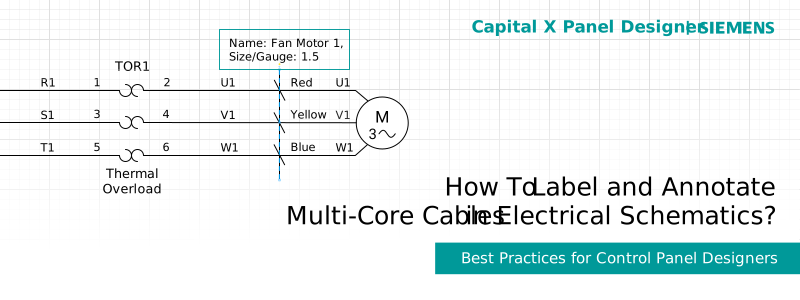
When you place a Multiline Cable Tag on a group of wires, it automatically detects the cable designation and displays all relevant information in a unified view. Core names, cable specifications, and custom cable data all appear together, eliminating the need to inspect individual wires.
- Place the symbol on your schematic. Drag and drop the Multiline Cable Tag symbol from the stencils and onto the wires you want to label. If needed, resize the symbol to fit your wire group perfectly. The moment you place it, the tag instantly displays the cable information and respective core names for all connected wires.
- Customize displayed information. Right-click on the symbol and select 'Edit Tag' to choose exactly which cable details you want to display. You can include brand, model, size/gauge, cable type, and any custom fields relevant to your project. This flexibility ensures your schematic shows the right level of detail for your specific project needs.
- Catch errors automatically. If any cables are assigned incorrectly or core names are mismatched, it will automatically detect these errors and highlight them in red.
What Cable Information Can You Display for Better Cable Annotation and Documentation?
Comprehensive cable annotations go beyond basic identification. The Multiline Cable Tag supports a wide range of standard and custom cable data fields that flow directly into your cable tags and generated reports.
Standard cable specifications include all the technical details your manufacturing team needs: number of cores, size/gauge, cable type, manufacturer/brand, model number, price, and more. These fields integrate with your component libraries and cable databases, ensuring consistency across projects.
Core-level details provide granular control over individual wire assignments within each cable. The system displays core names, colors, and functions, making it easy to verify terminations and troubleshoot connections during design or installation.
The ability to include additional cable data fields lets you customize cable documentation to match your specific project requirements. You might add installation notes specifying routing paths through the panel, shielding types, or approval status for design review workflows. These custom fields appear in cable tags and when generating reports, maintaining data consistency throughout the project.
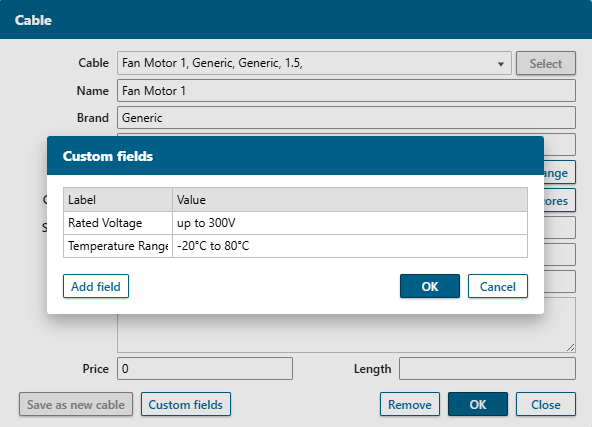
You may also add custom data fields to your components; read more on How to Add Custom Component Data for Advanced Schematic Annotation.
This flexible approach to cable data management means your electrical CAD schematic serves as the single source of truth for cable information, reducing discrepancies and simplifying project handoffs.
Benefits for an Improved Control Panel Design Workflow
How Does the Multiline Cable Tag Feature Streamline Cable Annotation and Cable Management?
Whether you're designing control panels, switchboards, or automation systems, having a complete view of cable information impacts accuracy and project timelines.
Instant cable identification: Quickly distinguish between cables in dense sections of your schematic. Rather than hovering over each wire or opening property dialogs, cable information is visible at a glance, dramatically reducing the time required to understand schematic intent.
Intelligent error detection: Catch problems before they reach the shop floor. If a core is incorrectly assigned or a cable reference is invalid, the system highlights the error in red directly on the problematic wire. This catches mistakes during design rather than discovering them during manufacturing or installation.
Flexible information display without complicated configuration: The Multiline Cable Tag can show basic cable identification for simple projects or expand to include custom specifications by adding custom cable data.
Faster design completion and review cycles: When cable information is instantly visible, design reviews move significantly faster. Engineers and panel designers spend less time on cross-referencing specifications and more time evaluating design decisions. What once required hours of verification can now be completed in minutes, accelerating project timelines without sacrificing quality.
Reduced wiring errors and manufacturing delays: Clear, consistent cable annotations mean fewer surprises when panels reach the manufacturing floor. Technicians have immediate access to complete cable specifications, core assignments, and routing information. This reduces assembly time, minimizes rework, and ensures the first build matches the design intent.
Improved schematic readability for all project stakeholders: Clean, professionally structured schematics benefit everyone who interacts with the design. Engineers and panel designers can quickly assess cable configurations during modifications. Project managers can review designs without drowning in technical clutter. Manufacturing teams can confidently execute builds, knowing the documentation is clear and complete.
Conclusion
Clearer schematics lead to better builds and fewer surprises throughout your project lifecycle. The Multiline Cable Tag symbol in Capital X Panel Designer helps you maintain accurate cable documentation, improve design readability, and reduce manual verification effort across even the most complex multi-page designs.
The combination of instant cable identification, automatic error detection, and flexible labeling options provides the visibility and control your engineering team needs to deliver exceptional results.
Behind these capabilities is an intuitive cable database interface that centralizes all your cable management in one place — no complex menus or buried settings, just straightforward control over your entire cable library.
Experience the difference that professional cable management makes in your design workflow. Use Multiline Cable Tags in your current projects and discover how proper cable labeling and annotation transform design efficiency, manufacturing accuracy, and project outcomes.
Sign up for a 30-day free trial of Capital X Panel Designer now.
Frequently Asked Questions (FAQs)
1. How do you label multi-core cables in an electrical schematic?
To label multi-core cables in an electrical schematic, use the Multiline Cable Tag in Capital X Panel Designer. It instantly displays cable information across multiple wire connections simultaneously.
2. What information should be included in electrical cable documentation?
Essential cable documentation should include cable designation, number of cores, conductor gauge/size, cable type, manufacturer/brand, and model number. Additionally, include core-level details like core names, colors, and type. For comprehensive project documentation, add custom fields such as installation notes, shielding requirements, routing references, and approval status.
3. Why is proper cable labeling important in control panel design?
Cable labeling directly impacts manufacturing accuracy, installation efficiency, and project timelines. Clear cable documentation reduces wiring errors during panel assembly, minimizes time spent cross-checking specifications during design reviews, and prevents costly rework. Well-labeled cables also improve schematic readability for all stakeholders and ensure compliance with industry documentation standards.
4. How can you prevent cable wiring errors in electrical schematics?
Prevent cable wiring errors by implementing automated validation in your electrical CAD schematic. Use cable tagging systems, such as the Multiline Cable Tag, that automatically detect mismatches in core assignments, incorrect cable references, or missing specification data. Capital X Panel Designer is a smart electrical CAD software that highlights errors in real-time as you design, catching mistakes before they reach manufacturing.
5. What is the difference between the Multiline Cable Tag versus the normal Cable Tag in Capital X Panel Designer, and their main benefits?
The Multiline Cable Tag displays cable information across multiple wires in one unified view, while the Cable Tag only shows cable information on each wire individually. Implement these cable tags on your wires to reference central data rather than containing static text, ensuring consistency across all pages. This eliminates the need to manually update multiple schematic pages when cable information changes.
6. How do you manage cable documentation across multi-page schematics?
Capital X Panel Designer provides a centralized and intelligent cable management system that propagates throughout your electrical schematic drawing, such as the Cable database. When you update cable specifications in one location, those changes reflect everywhere the cable appears, even across projects.
7. What industries benefit most from improved cable documentation?
Industries with complex control systems benefit significantly, for example, industrial automation and manufacturing, power generation and distribution, oil and gas processing facilities, water and wastewater treatment, building management systems, transportation infrastructure, marine and offshore installations, and pharmaceutical manufacturing. Any sector that designs multi-page electrical schematics with numerous multi-core cables will see substantial improvements in design efficiency, manufacturing accuracy, and project quality.