
June 10, 2026 · Capital X Panel Designer · Electrical CAD · What's New
6 Signs Your Electrical CAD Setup Is Due for an Upgrade in 2026
Your electrical CAD software should be making your work easier, not adding steps to it. If your team is managing file versions by hand, waiting on IT to set up new users, or manually reconciling electrical and mechanical designs, your current setup may be costing you more than you realize.
Here is what to look for, and what a modern cloud-native electrical CAD software can do to improve your workflow.
Key Takeaways
- Desktop CAD tools were not built for how engineering teams work today — version chaos, rigid licensing, and limited access are symptoms, not bugs.
- Cloud-native electrical CAD removes IT overhead — no installation, no downloads, no machine dependency, accessible from any browser, no extra cost for learning courses.
- Modern cloud-native electrical CAD is drag-and-drop intuitive, and engineers can produce real schematic work within hours of first use.
- Repetitive manual tasks like wire numbering, BOM updates, and report generation should not require engineering time — modern electrical CAD automates these entirely, freeing engineers to focus on actual design decisions.
- Most CAD automation projects pay for themselves within 6 to 9 months — for SMB engineering firms, the savings come from reduced rework, faster onboarding, lower IT overhead, and fewer revision cycles.
- ECAD-MCAD integration is no longer an enterprise-only capability — SMB engineering teams can bridge electrical and mechanical workflows without manual file transfers.
- Subscription-based licensing fits variable engineering workloads better than large upfront perpetual license investments.
- Summer 2026 is a practical window to make the switch — Capital X Panel Designer is available at 30% off from July 20 to August 7, 2026.
You are mid-project. A revision just came in. Now you need to track down which version of the schematic is current, manually update the BOM, and ping the mechanical team to check if the enclosure dimensions still match. Again.
This is not a one-off. It is just another Tuesday.
For a lot of electrical engineers working in industrial machinery, heavy equipment, energy and utilities, process industries, electronics, and medical device manufacturing, these are not edge cases. They are the actual workflow. And the tool sitting at the center of it, whether it is a legacy desktop CAD system or something that has not seen a meaningful update in years, is often making it worse, not better.
Here are six signs your electrical CAD setup is due for an upgrade, and what modern cloud-native tools contribute to meaningful changes:
1. Your team spends more time managing files than designing
You know the drill. Someone saves a revised schematic with a slightly different filename. Another engineer opens the previous version by mistake. Now there are two versions of the same drawing in circulation, and nobody is entirely sure which one reflects the latest client revision.
This is not a discipline problem. It is a workflow problem — and it is one of the most common time drains in electrical panel design teams, particularly in industrial machinery, heavy equipment, energy and utilities, process industries, electronics, and medical device manufacturing, where revision cycles are frequent and costly.
Modern cloud-native electrical schematic CAD platforms remove this entirely. When your designs live in a centralized, browser-based environment, every engineer on the project is looking at the same file, in real time. There is no "latest version" to track down because there is only one.
Capital X Panel Designer is built this way from the ground up. Not a desktop tool with a cloud sync layer on top — a genuinely cloud-native platform where collaboration is the default, not an add-on.
2. Onboarding a new engineer takes longer than it should
If bringing a new person onto your electrical design workflow involves a week of software installation, license transfers, and IT tickets before they can open a schematic drawing, that is not normal anymore, even if it has always been that way. It is in fact slowing the whole team down.
Cloud-native electrical CAD removes the installation step entirely. Open a browser from any device, log in, and the tool is there. No setup, no IT dependency, no waiting.
For smaller engineering businesses and SMBs especially, this matters more than it might seem. When your team is lean, every day a new hire spends waiting on software access is a day they are not contributing to the project.
There is also no course to take before they can use it. Modern cloud-native electrical CAD is built around drag-and-drop interfaces and intuitive schematic tools that engineers can pick up and work with on day one.
No certification, no week-long training sessions, no relying on the one person in the office who knows the software inside out. The learning curve that has always been a given with traditional electrical CAD tools is no longer the norm. A new engineer can open Capital X Panel Designer and start producing schematic work within hours, not weeks.
3. You cannot access or share your designs without being in the office
This one is less about remote work as a preference and more about practical project flexibility.
If a senior engineer needs to review a schematic from a client site, can they? If your team needs to share a design with a contractor or a client for sign-off, how many steps does that take? If a project file lives on a specific device in a specific office, what happens when that device is unavailable?
Desktop-based CAD tools were designed for a world where everyone was in the same building, working on the same machine, every day. That is not how most engineering teams operate now — especially across the industries where electrical panel design is critical, from industrial machinery and heavy equipment to medical devices and electronics.
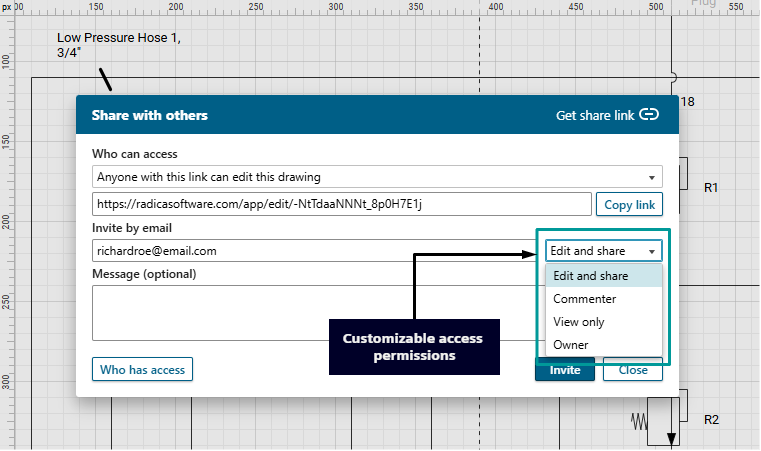
Cloud-native electrical CAD means your schematics are accessible from any device with a browser. Sharing a design for review is a link, not a file transfer, and access permissions are customizable. And your work is not tied to one physical location.
4. Your team is still doing manually what your electrical CAD tool should be doing automatically
This is the one issue engineers notice but rarely name. The signs are everywhere: manually updating wire numbers after a revision, re-entering component data that already exists somewhere else in the project, generating a BOM by copying values across rows, cross-referencing terminal connections by hand.
None of these tasks require engineering judgment. They require time. And on a lean team with tight project deadlines, that time adds up quickly.
Modern electrical schematic CAD tools automate the repetitive layer of panel design work almost entirely:
Autowiring connects symbols across a schematic automatically rather than requiring manual wire placement one segment at a time.
Automatic numbering renumbers wires, terminals, and components across the whole project the moment anything changes.
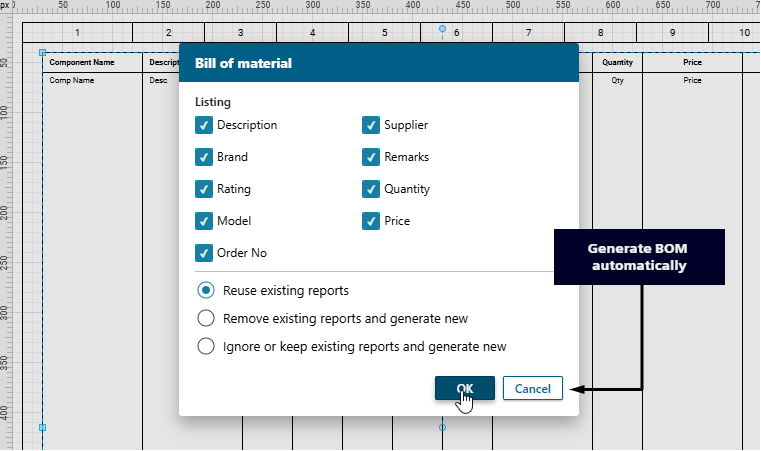
- BOM generation pulls directly from the schematic data and updates in a click.
- Panel layout generation places components, DIN rails, and ducts from the schematic without manual reconstruction.
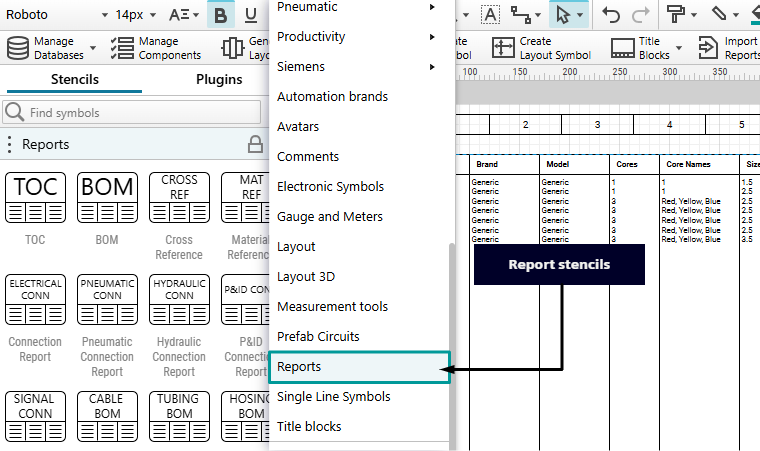
- Reports covering connection lists, cable schedules, and terminal strips generate from the live design rather than a separate document.
In Capital X Panel Designer, these are not premium add-ons. They are essential to how the platform works. The result is that engineers spend their time on the decisions that require engineering knowledge, not the administrative layer that surrounds them.
If your current tool requires manual steps for any of the above, that is not just an inconvenience. It is a measurable drag on every project your team delivers. Learn more about the benefits and features Capital X Panel Designer offers here.
5. Your electrical and mechanical teams are working in parallel but not together
For engineering teams in industrial machinery, heavy equipment, energy and utilities, process industries, electronics, and medical device manufacturing, this one hits particularly hard. The electrical side produces a schematic. The mechanical side produces an enclosure design. Then someone has to manually reconcile the two — checking that components fit, that clearances are correct, that the BOM reflects reality on both sides.
This is the ECAD-MCAD gap. And in teams where both disciplines are involved in the same project, it is one of the biggest sources of revision cycles, manufacturing rework, and project delays. For engineering teams working on projects where electrical and mechanical design have to fit together, this is where the gap between modern and legacy tools gets expensive.
The typical workflow without proper integration looks like this: electrical team finalizes the schematic, exports a file, mechanical team manually re-enters or translates the data into their environment, then someone has to cross-check that the components actually fit the enclosure, the BOM reflects both sides, and nothing got lost in the handoff. Repeat every time there is a revision.
Capital X Panel Designer Advanced addresses this by working within the Siemens Xcelerator ecosystem. Rather than relying on external file translators or manual data entry between tools, the Advanced plan allows teams to transfer schematic data directly to Designcenter Solid Edge or Designcenter X, and share design documentation in PDF format.
Engineers can also publish BOMs to Teamcenter. The data moves in a structured, traceable way between tools that are built to work together.
This is worth being specific about: the Advanced plan does not create automatic live sync between electrical and mechanical environments. What it does eliminate is the unreliable part of the handoff — the manual re-entry, the format mismatches, the version guesswork that happens when two disconnected tools are forced to talk to each other through workarounds.
If your team is already using Designcenter Solid Edge, Designcenter X, or Teamcenter, the Capital X Panel Designer Advanced completes that workflow on the electrical side. If you are not using those tools yet, Capital X Panel Designer works as a capable standalone electrical CAD platform across all plan tiers.
If your team is still reconciling electrical and mechanical designs manually, that workflow is worth revisiting.
6. Your licensing model does not match how your team works
Perpetual licensing made sense when software was a one-time capital investment and your team size was fixed. Pay once, use it for years, upgrade when you have budget for it.
But engineering teams today, particularly smaller engineering companies handling variable project loads or project-based hiring, often do not work that way. Workloads fluctuate. Team sizes change. A licensing model that locks you into fixed seats, demands significant upfront investment, and ties upgrades to separate purchase decisions creates friction that most smaller firms can no longer afford.
Subscription-based electrical CAD changes the cost structure in a few significant ways. There is no large upfront payment. Updates and new features are included automatically — you are always on the current version, not the one you could last afford to upgrade to. And you can scale access up or down as your project demands change.
For engineering businesses evaluating software investment decisions mid-year, the comparison is worth doing honestly:
- What did your current tool cost to acquire, and what does it cost to maintain?
- How often do you receive updates?
- What happens to your workflow when a license expires, or a seat is tied to a specific machine?
Subscription-based cloud CAD like Capital X Panel Designer is designed around predictable costs and operational flexibility — both of which matter for teams where every line of the budget has a job to do.
A note for engineering managers, founders, and CEOs
If you are the one making the software decision rather than using it daily, the question is not really only about features. It is about whether the investment pays for itself, and how quickly.
The honest answer:
Most CAD automation projects return their cost within 6 to 9 months. The savings come from multiple directions at once:
➡️ Less time spent on manual drafting and repetitive documentation
➡️ Fewer revision cycles caused by version mismatches between electrical and mechanical teams
➡️ Faster onboarding that does not depend on one experienced engineer holding everything together
➡️ Lower IT and infrastructure overhead with no local installation to maintain
For SMB engineering firms specifically, these are not marginal gains. When your team is small and every project has a hard deadline, anything that removes manual overhead directly protects your margins and your delivery timeline.
The other consideration is risk. Sticking with a tool your team has outgrown is not a neutral decision. Every manual step is an opportunity for error. Every file version conflict is a potential rework cost. Every week a new hire spends getting up to speed on an unintuitive system is a week of lost productivity. The cost of staying is real, even if it is harder to put a number on than a subscription fee.
Cloud-native electrical CAD solutions like Capital X Panel Designer are built for engineering businesses that need to move fast, stay lean, and deliver consistently. Not enterprise software scaled down. Purpose-built for teams where every tool investment has to earn its place.
If you have been ticking these off in your head, this summer is a good time to act
Evaluating a new electrical CAD platform does not have to mean committing before you are ready. Capital X Panel Designer offers a free 30-day trial, enough time to work through a real project and see how it fits your team's workflow before making any decision.
And if you decide to move forward, the timing works in your favor. The Capital X Panel Designer Summer Sale* runs from July 20 to August 7, 2026, with 30% off all plans using code SUMMER30 at checkout.
For teams requiring ECAD-MCAD integration, don't miss Capital X Panel Designer Advanced plan at 30% off during the same window.
Start your free trial today and explore the platform at your own pace. When the Summer Sale opens, you will already know whether it is the right fit.
*Summer Sale runs from July 20 to August 7, 2026. Terms and conditions apply.
Frequently Asked Questions (FAQs)
1. Is cloud-native electrical CAD reliable enough for professional engineering work?
Yes. Cloud-native does not mean lightweight. Modern cloud-native electrical CAD platforms handle the full scope of professional panel design work — end-to-end schematic creation, autowiring, automatic wire and component numbering, panel layout generation, BOM automation, terminal strip management, multi-standard symbol libraries, and real-time collaboration.
Capital X Panel Designer is used by engineering teams across industrial machinery, heavy equipment, energy and utilities, process industries, electronics, and medical device manufacturing. The browser-based delivery method changes where the software runs, not what it can do.
2. How long does it take to migrate from a desktop CAD tool to a cloud-native platform?
Less time than most teams expect. Cloud-native platforms like Capital X Panel Designer are designed for fast adoption. There is no installation process, and the drag-and-drop interface means engineers can start producing real work within hours of first login.
For data migration, Capital X Panel Designer supports import of industry-standard formats including DXF and DWG, so existing design files are not stranded. Most teams are productive within days, not weeks. You can learn how to migrate your drawings here.
3. Can I try Capital X Panel Designer before committing to a subscription?
Yes. Capital X Panel Designer offers a free 30-day trial with full feature access across all plan tiers. There is no credit card required to start. This also makes the Summer Sale timing practical — start the free trial now, evaluate the platform against a real project, and purchase during the July 20 to August 7 window to lock in the 30% discount.
4. What happens to my existing electrical CAD files if I switch?
Capital X Panel Designer supports import of DXF and DWG file formats, which covers the most common export formats from legacy desktop electrical CAD tools. Your existing component databases can also be imported. The transition is designed to be practical rather than requiring teams to start from scratch..
5. Does Capital X Panel Designer have an on-premise option?
Yes. The Standard plan includes both cloud-native and on-premise access under a single subscription. Teams that require a desktop-based working environment, or that operate across both settings depending on the project, can do so without needing separate licenses. The on-premise version also supports electrical, pneumatic, hydraulic, and P&ID design alongside the cloud platform. A free trial for on-premise version is also available here.
6. Is Capital X Panel Designer suitable for a one-person electrical engineering operation?
Yes. The Essentials plan is designed for individual engineers and small teams who need professional-grade electrical CAD without enterprise-level cost or IT overhead. A monthly plan is available, which means there is no long-term commitment required. Freelance electrical engineers and solo panel designers working across industries like electronics or medical device manufacturing use it for exactly this reason.
7. How does subscription pricing compare to perpetual licensing over the long term?
The answer depends on how you account for the full cost of ownership. Perpetual licensing looks cheaper upfront but carries ongoing maintenance fees, manual upgrade costs, and IT infrastructure requirements that accumulate over time.
Subscription-based cloud CAD bundles updates, maintenance, and platform access into a single predictable fee with no additional IT overhead.
For most SMB engineering teams, the total cost of ownership over a three-to-five-year period favors subscription, particularly when team size fluctuates or project workloads are variable.
8. What industries are Capital X Panel Designer designed for?
Capital X Panel Designer is purpose-built for electrical panel design and schematic work across industries including industrial machinery, heavy equipment, energy and utilities, process industries, electronics, and medical device manufacturing. It supports IEC, JIC/NFPA, P&ID, hydraulic, and pneumatic standards, making it applicable across diverse engineering environments.
9. What is the difference between Capital X Panel Designer Essentials, Standard, and Advanced?
Essentials is a fully cloud-native plan covering core electrical schematic design, automation tools, real-time collaboration, and panel layout generation.
Standard adds an on-premise option and expands circuit type support to include pneumatic, hydraulic, and P&ID design.
Advanced includes everything in Standard and adds electromechanical codesign integration within the Siemens Xcelerator ecosystem, enabling structured data transfer to Designcenter Solid Edge, Designcenter X, and BOM publishing to Teamcenter.
All three plans are available at 30% off during the Summer Sale from July 20 to August 7, 2026.
10. Does the 2026 Summer Sale apply to existing users or only new subscribers?
Both. Existing users purchasing additional licenses can also apply the code SUMMER30 at checkout to receive 30% off. The offer covers all Capital X Panel Designer plans — Essentials, Standard, and Advanced — and runs from July 20 to August 7, 2026.