
September 30, 2025 · Capital X Panel Designer · Electrical CAD
Save and Reuse Schematic Pages Across Projects - Simplifying Electrical Circuit Design Drawings
Key Takeaways
- Engineers waste hours redrawing the same circuits in traditional electrical CAD, which leads to frustration and lost time.
- Copy-paste between schematic drawings usually creates broken connections, missing wire links, and errors that require tedious troubleshooting.
- The ‘Save Pages to stencil’ feature in Capital X Panel Designer allows engineers to save entire schematic pages, or even multiple pages, directly into the stencil library for seamless reuse schematic workflows.
- This feature preserves all critical connectivity such as terminal lists, wire links, and wire buses, ensuring that electrical schematic designs remain fully functional.
- Engineers can accelerate project setup as they can reuse proven schematic pages instead of redrawing from scratch.
- Engineers save significant time by eliminating redraws and troubleshooting, which allows them to focus more on innovation and design.
- Engineers using schematic design reuse can create circuits faster with Capital X Panel Designer's smart automation tools, while __eliminating connectivity errors__ that plague traditional copy-paste methods.
What is Schematic Design Reuse?
Schematic design reuse involves saving and repurposing complete electrical circuit pages across multiple projects, eliminating the need to redraw identical configurations. This approach preserves all connections, wire links, and terminal lists while dramatically reducing design time and errors.
The Problem: Time Lost to Repetitive Circuit Redrawing
The Risk of Redrawing Circuits in Electrical CAD Software
Electrical engineers and panel designer engineers frequently find themselves recreating the same electrical circuit configurations across multiple projects, a repetitive process that consumes valuable time and introduces opportunities for errors. In any traditional electrical CAD, redrawing entire schematic pages from scratch is especially time-consuming — and many wish there were a way to seamlessly reuse schematic symbols and complete, connected schematic pages without the headaches.
While the copy-paste functionality has long been available, anyone who has transferred complex schematic pages between drawings knows the frustration that often follows: broken connections, missing wire links, and compromised terminal lists that require hours of painstaking troubleshooting to resolve.
These connectivity issues represent more than minor inconveniences — they can significantly impact project timelines and quality. Troubleshooting broken connections after copy-paste operations can add substantial time per schematic page, multiplying delays across large projects.
The Solution: Intelligent Schematic Design Reuse
How can Engineers Seamlessly Save and Reuse Schematic Pages Across Drawings?
With the ‘Save pages to stencil’ feature in Capital X Panel Designer, you can store an entire schematic page, or even multiple pages at once directly in your stencil library. This reuse schematic capability is part of Capital X Panel Designer's suite of smart automation tools that help engineers create circuits faster than traditional software.
This powerful functionality goes far beyond graphic copying, intelligently maintaining all the critical connections that make your electrical schematic design functional.
Available within Siemens’ cloud-native electrical CAD, this feature gives engineers a smarter way to reuse their circuit designs, accelerating workflows and reducing errors in complex electrical CAD design projects.
What makes this different from traditional copy-paste? Unlike standard CAD copy functions that only duplicate visual elements, the 'Save pages to stencil' feature preserves:
- Terminal block assignments and numbering
- Wire numbers and cross-references
- Component interconnections and wire connections
- Multi-page wire buses and connection logic
Benefits: Why Schematic Design Reuse Matters
Why Should Engineers Reuse Schematic Pages Instead of Redrawing
Save complete schematic designs: Store complex circuit arrangements, control systems, or power distribution networks as ready-to-use stencils for future schematic design projects. Common reuse schematic applications include motor control circuits, safety interlocks, power distribution panels, control system templates, and other frequently used circuit configurations.
Speed up new projects: Reuse schematic pages that are proven and tested instead of redrawing from scratch, so you can start faster with designs you already trust. Engineers can significantly reduce initial project setup time when leveraging schematic design reuse capabilities.
Build a personal design library: Create a comprehensive collection of your most frequently used circuit configurations, making your electrical CAD software more efficient for every schematic design. A well-organized reuse schematic library can contain standardized circuit templates that cover the majority of typical project requirements.
Share standardized designs: Establish consistency across projects by sharing stencils of approved design elements, ensuring your panel design maintains professional standards. Organizations using schematic design reuse libraries experience fewer design review iterations and improved compliance with internal standards.
Enhance collaboration across teams: Engineers, panel designers, and technicians can work from the same trusted schematic libraries, reducing miscommunication and ensuring everyone follows the same design standards, and promoting team standardization.
Preserved connectivity: Unlike traditional copy-paste methods, all critical connections in your schematic design will be preserved exactly as you designed them. This includes wire numbering sequences, terminal assignments, and multi-page wire connections — all automatically maintained.
Significant time savings: Eliminate hours spent troubleshooting broken connections and redrawing circuits from scratch. What once required manual effort is now automated. Substantial time savings are achieved on projects where reuse schematic techniques are applied extensively throughout the design.
Step-by-Step Guide
How to Save Multiple Pages of Schematic Drawings in Your Stencil
Using the ‘Save pages to stencil’ feature is a more convenient method to reuse your circuit designs, helping you speed up new projects with proven schematics while gaining valuable time savings. The schematic design reuse process is quick and intuitive; just access any Capital X Panel Designer drawing and:
1. Prepare your stencil library: Open any custom stencil or create a 'New stencil' in the stencil bar.
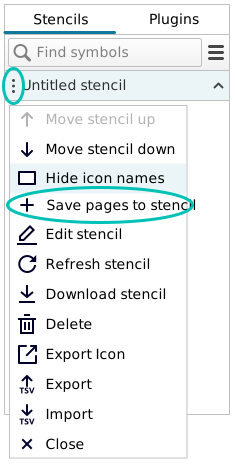
2. Initiate the save process: Click on the three-dots menu and select 'Save pages to stencil'.
3. Select and name your pages: Choose the pages you wish to save in this dialog and also rename the pages that you saved for easy identification.
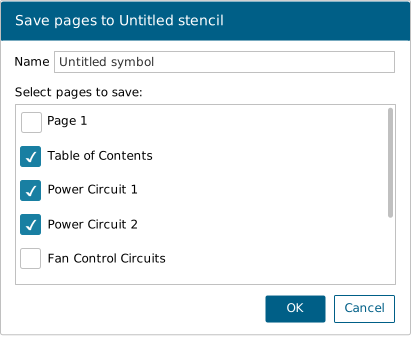
- Click 'OK', and your pages will be saved as a symbol on the stencil. The time taken for the saving process depends on the number of pages you have saved.
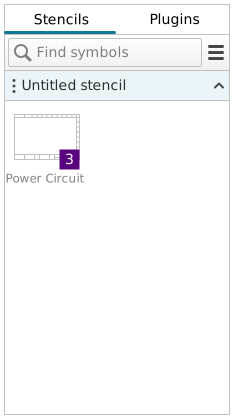
- The numbering within the symbol indicates the total number of pages saved. For instance, if you saved three pages, the number shown on your symbol will be "3".
4. Deploy saved schematics: To reuse the saved schematic pages on another project, open the same stencil and drag and drop the circuit onto the drawing. The schematic design reuse process automatically recreates all pages with full connectivity intact — no manual rewiring required. Capital X Panel Designer will automatically recreate the pages and position the designs as they were saved.
Best Practices for Maximum Reuse Schematic Efficiency
Maximize the value of your reuse schematic library with these organizational strategies that save time and ensure consistency across projects:
Organize your library by function: Group saved schematics by circuit type (power distribution, motor control, safety systems, communication networks) for faster retrieval.
Document your templates: Add brief descriptions to each saved schematic template explaining its application, ratings, and any customization points.
Version your designs: Include version numbers or dates in template names to track improvements and maintain design history.
Standardize naming conventions: Establish a consistent naming system across your team to ensure everyone can find and reuse schematic templates efficiently.
Regular library audits: Review and update your reuse schematic library quarterly to remove obsolete designs and add new standardized circuits.
Productivity Impacts
Capital X Panel Designer delivers measurable productivity improvements through smart automation:
- Faster circuit creation compared to traditional electrical CAD software
- Faster design completion with intelligent automation tools
- Significantly reduced errors through preserved connectivity in schematic design reuse
- Faster time-to-productivity — engineers become productive in days rather than the months required for traditional CAD packages
- Lower cost of ownership — monthly subscription costs are notably lower than traditional on-premises electrical CAD tools
- Minimal training requirements — intuitive design enables engineers to start creating schematics immediately
Conclusion
As electrical and panel design projects grow in complexity, the tools engineers rely on must keep pace. Schematic design reuse marks a shift from repetitive redrawing to intelligent template deployment — helping teams focus on innovation rather than recreation.
The ‘Save pages to stencil’ feature in Capital X Panel Designer enables engineers to:
- Reuse complete schematic designs instantly
- Eliminate repetitive redrawing and reconnection of identical circuits
- Transform a time-consuming, error-prone process into a streamlined workflow
This approach delivers consistent, professional results across documentation and client deliverables. It strengthens collaboration by allowing engineers, panel designers, and technicians to work from the same trusted schematic libraries while maintaining design standards.
The impact extends beyond time savings. Schematic reuse empowers teams to scale expertise, ensure quality, and deliver consistent outcomes across every project—making it a competitive necessity for modern engineering teams.
Start implementing schematic design reuse today!
Sign up for a 30-day free trial now.
Frequently Asked Questions (FAQs)
1. Can I reuse schematics across different project types?
Yes, the ‘Save pages to stencil’ feature works across all project types in Capital X Panel Designer. Whether you're working on control panels, power distribution, or automation systems, saved schematic pages maintain full connectivity when transferred between projects.
2. Will my wire numbers and terminal assignments be preserved?
Absolutely. Unlike traditional copy-paste, schematic design reuse in Capital X Panel Designer preserves all wire numbers, terminal block assignments, and cross-references automatically.
3. How many schematic pages can I save as a single reusable template?
You can save multiple pages simultaneously — the system will indicate the page count on the stencil symbol. This is ideal for complex multi-page circuits that need to stay together.
4. Can multiple team members access the same reuse schematic library?
Yes, Capital X Panel Designer supports shared stencil libraries, enabling teams to work from standardized, approved circuit templates and maintain consistent design standards across all projects.
5. Does this work with components from different manufacturers?
Yes, the ‘Save pages to stencil’ feature preserves component specifications and manufacturer data, ensuring that all device information transfers correctly to new projects.